You spent three hours making your resume look sharp. Two neat columns, a skills table, a little text box with your contact info at the top. Then you apply to 40 jobs and hear nothing back. Was it the design?
Maybe. Here's what actually happens when an applicant tracking system opens your file, and which layout choices are risky versus perfectly fine.
Most modern ATS can read simple tables and columns, but text boxes, headers, and complex layouts still scramble resume parsing often.
How Does Resume Parsing Actually Work?
An ATS doesn't see your resume the way a person does. It pulls out raw text, tries to figure out reading order, and sorts chunks into fields like name, job title, and dates. Layout problems happen when that reading order gets confused.
The software reads text, not design
When you upload a resume, the applicant tracking system extracts the text layer from your PDF or Word file. Fonts, colors, and boxes mostly disappear. What's left is a stream of words, and the parser has to guess what belongs where.
It's looking for patterns. A company name followed by a job title followed by a date range? That's probably a work experience entry. An email address? Contact field. Simple enough when your resume is laid out top to bottom.
Reading order is where things go wrong
Here's the thing. A human reads a two-column resume by scanning the left column, then the right. A parser might read straight across the page, line by line, stitching your left sidebar into your right-hand job history. So "Python, SQL, Tableau" ends up glued to the middle of a bullet about managing a sales team.
And once data lands in the wrong field, a recruiter searching for "SQL" might not find you. Not because you lack the skill. Because the software filed it under nonsense.
Not every ATS is equally smart
There are dozens of systems out there, from big enterprise platforms to cheap plug-ins small businesses bolt onto their careers page. Newer ones handle layouts much better than older ones. The problem? You almost never know which one a company uses. So you design for the weakest link.
Can ATS Read Tables, Columns, and Text Boxes?
Tables and columns are a gamble that often works with newer systems but can fail with older ones. Text boxes are the real troublemaker because many parsers skip them entirely. Headers and footers carry similar risk.
Tables: usually readable, sometimes mangled
Simple tables with plain text in each cell usually parse okay in modern systems. The trouble starts with merged cells, nested tables, or tables used to fake a multi-column layout. Some parsers read cell by cell across rows, which can jumble dates and job titles.
If you want a skills grid, a basic table is lower risk than you'd think. But using a giant invisible table to structure your entire resume? Skip it.
Columns: fine for some, chaos for others
True columns created with your word processor's column feature tend to parse better than columns faked with tabs, tables, or text boxes. Still, two-column layouts are the single most common reason I see contact info and skills land in the wrong place during resume parsing tests.
A safer move: keep your main content (experience, education) in one column. If you love a sidebar, use it only for things that would survive being misread, like a short list of skills you also mention in your bullets.
Text boxes: the one to avoid
Look, text boxes are the worst offender. Many parsers treat them as floating objects separate from the main text layer, so the content gets skipped or dumped at the end. Put your name and phone number in a text box and some systems will create a profile with no contact details at all. Ouch.
Same deal with headers and footers. Plenty of people tuck their email into the page header. Don't. Put it in the body of the document.
| Element | ATS Risk Level | What Typically Happens | Safer Alternative |
|---|---|---|---|
| Single-column layout | Low | Parses cleanly in nearly every system | Use as your default |
| Simple table (plain text) | Low to medium | Usually readable, may scramble row order | Keep tables small, no merged cells |
| Two-column layout | Medium | Text from both columns can merge line by line | Main content in one column |
| Text boxes | High | Content skipped or moved out of order | Type directly into the document body |
| Headers and footers | High | Contact info often ignored | Put contact details at the top of the body |
| Icons and graphics | High | Ignored completely, labels lost | Use plain text labels like "Email:" |
| Skill rating bars | High | Parser sees nothing, skill may vanish | List skills as text |
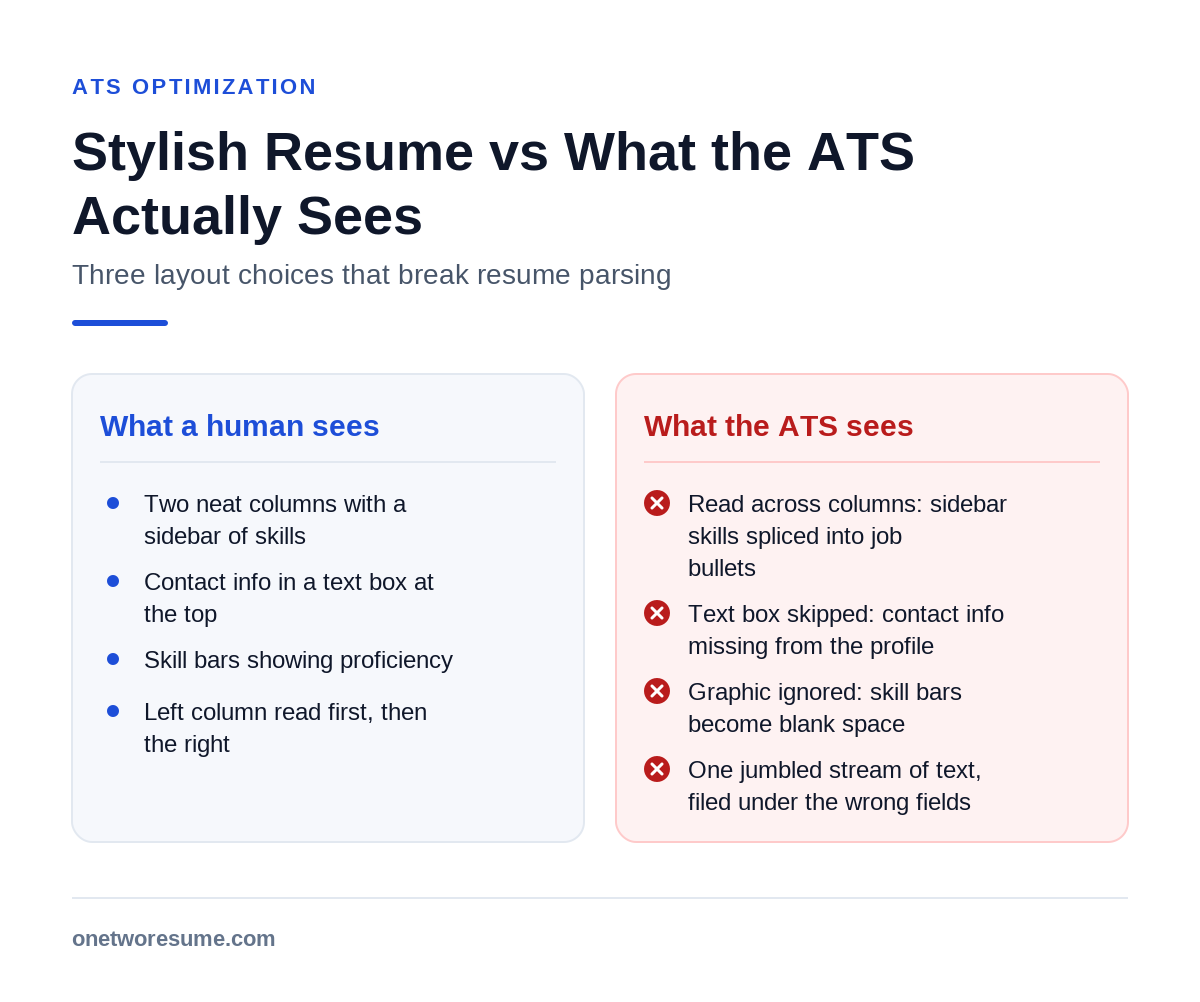
Stylish Resume vs What the ATS Actually Sees: Three layout choices that break resume parsing
What Else Breaks Resume Parsing?
Layout isn't the only culprit. File type, fancy section headings, images, and unusual date formats cause just as many problems. Most fixes take less than 20 minutes.
File format and how the PDF was made
A .docx file is the most reliably parsed format across systems. Text-based PDFs work well with most modern ATS too. But a PDF exported from a design tool, or worse, a scanned image of your resume, may contain no readable text at all. Quick test: open your PDF and try to highlight a sentence. If you can't select the words, neither can the parser.
Always follow the employer's instructions. If they ask for Word, send Word.
Creative headings and odd formatting
Parsers look for familiar section names. "Work Experience" and "Education" get recognized. "Where I've Made Magic" probably doesn't. Other things that trip systems up:
- Icons instead of words (a little phone symbol instead of "Phone")
- Skill bars or star ratings, which are just images to software
- Dates written inconsistently, like "Spring '22" in one spot and "03/2021" in another
- Unusual fonts that don't embed properly in the file
- Special characters used as bullets
Indeed's guide on how to write an ATS-friendly resume echoes most of this, recommending standard headings, simple formatting, and keywords pulled from the job description.
Remember there's a human on the other side
Truth is, the ATS doesn't usually reject you on its own. Recruiters and HR specialists search, filter, and review what the system stores. The BLS Occupational Outlook Handbook on Human Resources Specialists describes how these professionals screen and interview candidates, and that screening often starts with keyword searches inside the ATS. If your data got scrambled, you just won't show up in their results.
So the goal isn't to beat a robot. It's to make sure your info arrives intact for the person doing the searching.
How Can You Test Your Resume Before Applying?
Run your resume through an ATS scanner, then do a plain-text check yourself. If the content reads in a logical order with nothing missing, you're in good shape.
Use an ATS scanner
An ATS scanner simulates what parsing software extracts from your file. Upload your resume to our Resume Checker and you'll see whether your contact info, job titles, and dates come through cleanly, plus how well your keywords match a target role.
Try the copy-paste test
This one's free and takes two minutes. Select everything in your resume, copy it, and paste it into a plain text editor like Notepad. Then ask:
- Is your name and contact info at the top?
- Do jobs appear in order with titles and dates together?
- Did any sections disappear?
- Are skills mixed into random bullet points?
If it looks messy in Notepad, it probably looks messy to the ATS.
Start from an ATS-safe template
Honestly, the easiest fix is to not fight the problem at all. Build with a template designed to parse cleanly. Our Resume Builder uses single-column, text-based layouts that still look polished. And if you want inspiration for your field, browse our Resume Examples to see clean designs that work for real roles.
Key Takeaways
- Resume parsing turns your file into plain text, and layout problems happen when reading order gets confused.
- Simple tables usually work, but merged cells and table-based layouts are risky.
- Two-column resumes can parse fine in newer systems, but they're a gamble with older ones.
- Text boxes, headers, and footers are the biggest culprits. Keep contact info in the main body.
- Graphics, icons, and skill bars are invisible to most applicant tracking systems.
- Use .docx or a text-based PDF, standard headings, and consistent date formats.
- Test with an ATS scanner and the copy-paste trick before you hit submit.
Make Sure Your Resume Gets Read
A great resume does nothing if the software can't read it. You don't have to give up good design, you just have to pick the right kind. OneTwo Resume gives you ATS-friendly templates, a built-in resume checker, and the tools to make sure every word you wrote actually reaches a recruiter. Build yours today and stop wondering why you're not hearing back.