To beat the ATS, job seekers must avoid common pitfalls that prevent their resumes from being properly analyzed by automated systems.
Navigating the job market can be a dizzying experience, especially when you realize that many companies use Applicant Tracking Systems (ATS) to filter resumes. These systems help employers quickly sift through hundreds of applications. If you're not familiar with how ATS works, you might be leaving your chances of landing an interview on the table. Here, we explore common ATS pitfalls and how to avoid them.
1. Are You Using the Right Resume Format?
The format of your resume can significantly impact its chances of getting through the ATS. Not all file formats are ATS-friendly.
When it comes to submitting your resume, format matters more than you might think. An ATS can struggle with certain formats, such as PDFs or intricate designs. Stick to simpler formats to make it easier for the system to read your content. Here are some common formats and their implications:
H3: Preferred Formats
- Word Document (.docx): Often the safest choice for ATS.
- Plain Text (.txt): Works but lacks design elements.
- PDF: Can confuse some systems; use carefully.
H3: Design Matters
- Simple Layouts: Avoid complex graphical designs.
- Fonts: Use standard fonts like Arial, Times New Roman, or Calibri.
- Avoid Tables and Columns: These can confuse the ATS.
2. Did You Optimize for Keywords?
Keywords in your resume are crucial for beating the ATS, making it relevant to the job description.
The ATS scans for specific keywords related to the job you’re applying for. If you don’t have them, your resume may not even be considered. Here’s how to ensure you’ve got the right keywords:
H3: How to Find Keywords
- Job Descriptions: Highlight phrases and skills that repeatedly appear.
- Competitor Resumes: Check resumes on sites like Indeed Career Guide.
H3: Placement Matters
- Include Keywords: In your summary, work experience, and skills sections.
- Analyze Your Resume: Use a Resume Checker to see which keywords are missing.
3. Are You Using Too Much Industry Jargon?
ATS systems may not recognize certain industry jargon, especially if it’s not commonly used.
While you want to sound knowledgeable, overloading your resume with jargon can backfire. It might make your resume sound impressive to a human but difficult for the ATS to read. Here’s how to balance it out:
H3: Know Your Audience
- Use Simple Language: Avoid terms that are overly technical unless they appear in the job description.
- Be Clear: Make sure that your skills are presented straightforwardly to ensure clarity.
H3: Build for Both ATS and Humans
- Mix it Up: Use everyday language along with some industry-related terms.
- Feedback: Ask a friend or mentor to review it before submitting.
4. Do You Have Unnecessary Information?
Including unnecessary details can clutter your resume and confuse the ATS.
Sometimes less is more. ATS systems prefer resumes that are streamlined and focused. Including irrelevant work experience or personal information might hinder your chances. Here are some tips:
H3: What to Exclude
- Irrelevant Work Experience: Only include what’s pertinent to the role.
- Hobbies and Interests: Only if they relate directly to the job.
H3: Keeping It Clean
- Focus on Achievements: Highlight accomplishments that relate to the job description.
- Use Bullet Points: They're easier for both ATS and readers to digest.
5. Are You Tailoring Your Resume for Every Job?
Tailoring your resume is essential for beating the ATS and ensuring you appear relevant to each position.
A one-size-fits-all approach simply doesn’t cut it. To truly stand out to an ATS, make adjustments based on the specific job description. Here’s how:
H3: Customize for Each Application
- Job Titles: Use the same title as the job posting if it describes your previous role accurately.
- Skills and Experience: Adjust this section to reflect what the employer finds most essential.
H3: Check Your Matches
- Use Tools: Compare your resume against job postings using a Resume Builder to see how well it matches.
6. Is Your Contact Information Up to Date?
Outdated contact information can lead to missed opportunities when employers try to reach you.
It might seem trivial, but having your most current contact information is vital. Imagine missing a potential job offer because your number was wrong or your email was outdated. Keep it straightforward:
H3: Essentials to Double-Check
- Phone Number: Make sure it’s the correct one.
- Email Address: Use a professional address. Avoid cutesy ones like “lovemydog123@gmail.com.”
H3: LinkedIn Matters
- Sync with LinkedIn: Ensure your LinkedIn profile links match your resume. Use our LinkedIn Optimizer for best practices.
7. Have You Proofread Your Resume?
Spelling and grammatical errors can make your application look unprofessional, affecting ATS screening.
Proofreading is crucial. Mistakes can lead the ATS to misinterpret your content or even reject your resume altogether. Here’s what you should do:
H3: Quick Tips for Proofreading
- Read It Aloud: Often catches errors you might otherwise overlook.
- Have Someone Else Review It: A fresh set of eyes can spot mistakes.
H3: Use Tools
- Grammar Checkers: Consider using online tools to help catch errors before submitting.
| Common ATS Pitfalls | Description | How to Avoid |
|---|---|---|
| Wrong File Format | System can't read your resume | Use Word or plain text |
| Unoptimized Keywords | Lack of necessary keywords | Tailor your resume for each job |
| Overused Jargon | Unrecognized terms | Use simpler language |
| Irrelevant Info | Clutter and confusion | Stick to what's relevant |
| No Customization | Generic applications | Adjust for each role |
| Outdated Contact Info | Missed opportunities | Regularly update your information |
| Lack of Proofreading | Unprofessional impression | Carefully proofread before sending |
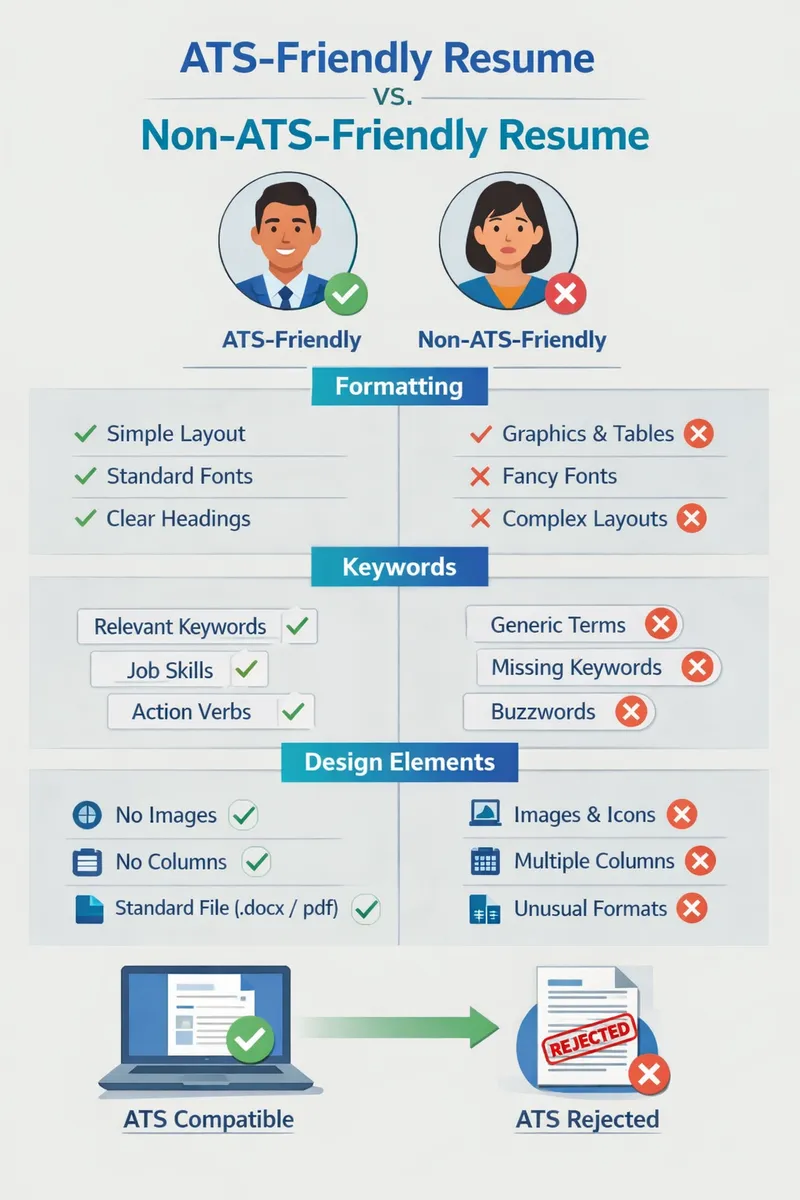
Visual comparing ATS-friendly versus non-ATS-friendly resumes, highlighting key formatting elements and keywords
Key Takeaways:
- Always choose the right resume format for ATS.
- Use relevant keywords from job descriptions.
- Avoid unnecessary jargon and information.
- Tailor your resume for each application.
- Proofread thoroughly to avoid errors.
At OneTwo Resume, we understand the complexities of job searching today. Our tools and resources can help you create an ATS-friendly resume that stands out. Don't leave your dream job to chance; take the time to beat the ATS and get in front of hiring managers today.