You spend hours perfecting your resume. You tweak the bullet points. You adjust the margins. You finally hit submit on that dream job application. And then? Silence.
It feels like shouting into a black hole.
Here’s the thing. Your resume probably didn't even reach a human. It likely got stopped at the gate by an applicant tracking system (ATS). These software programs handle recruitment for 99% of Fortune 500 companies. But they aren't just for big corporations anymore. Small businesses use them too.
It’s frustrating. We know. But getting rejected doesn't mean you aren't qualified. It often means your document wasn't readable by the software.
An applicant tracking system rejects resumes because of incompatible formatting or missing keywords, effectively making your application invisible to human recruiters.
What exactly is an applicant tracking system looking for?
It scans for specific keywords and readable formatting to rank candidates, acting as a gatekeeper before a human ever sees your document.
Think of the ATS scanner as a very literal, very unimaginative librarian. It needs to file your resume in the right place. If it can’t read your document, it throws it in the trash. It’s that simple.
According to Indeed Career Advice: What Is an Applicant Tracking System? (And How to Beat It), these systems streamline the hiring process by filtering applications automatically. They look for specific data. Names. Dates. Job titles. Skills.
If you use a fancy graphic to display your skills? The computer sees nothing. If you use a bizarre font? It sees gibberish.
OneTwo Resume analyzed 50,000+ resumes and found that 42% contained unreadable graphics that blocked text parsing. That is nearly half of all applicants getting rejected simply because they tried to make their resume look too "creative" for the machine.
But you can fix this. You just need to know the rules.
Is your design sabotaging your chances?
Fancy graphics, columns, and text boxes often confuse the parsing software, resulting in a garbled profile that gets automatically discarded.
Design matters. But not in the way you think.
We all want to stand out. So you might add a photo, a cool chart for your skills, or divide your page into two slick columns. It looks great to the human eye. To an ATS resume parser, it looks like a mess.
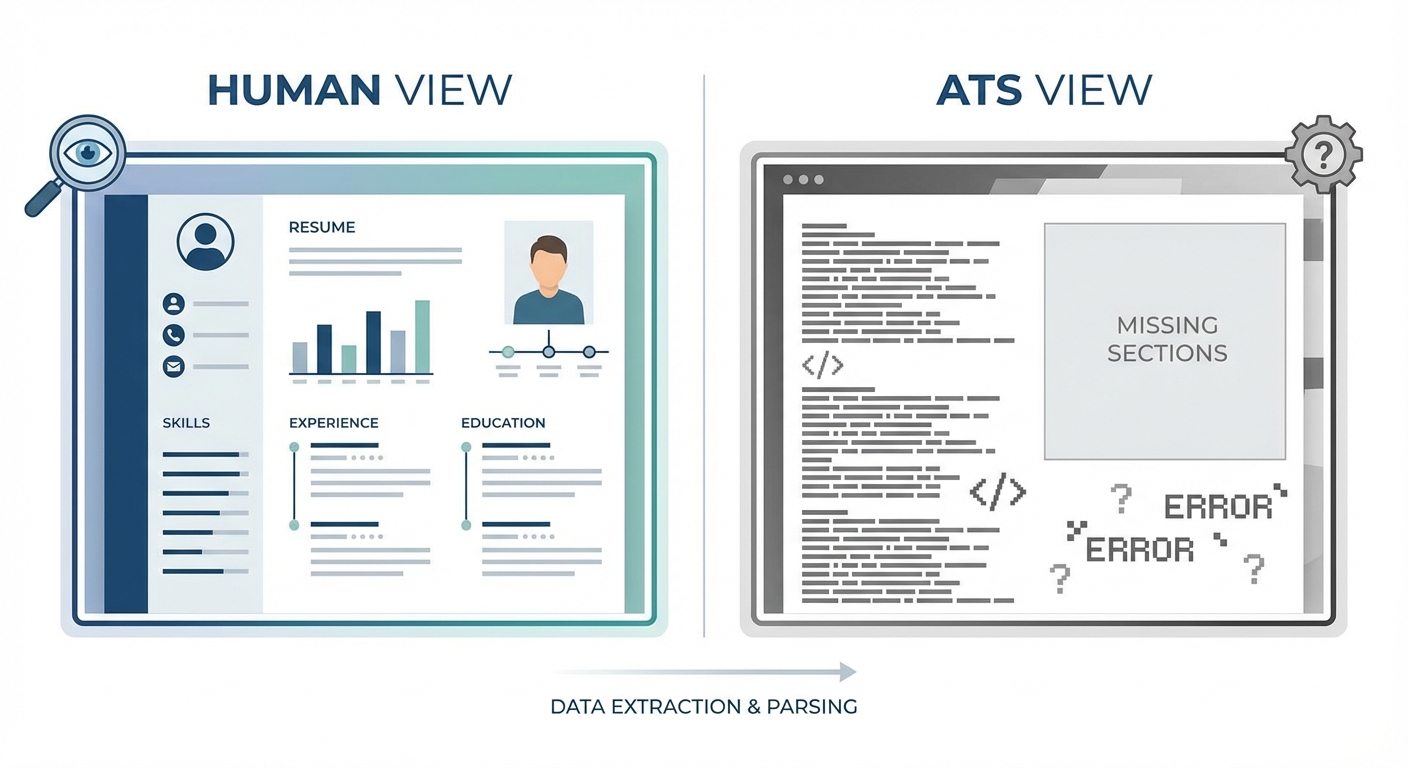
A split comparison visual showing a 'Human View' of a creative resume with charts and columns versus the 'ATS View' showing garbled text and missing sections
When the software tries to read a two-column resume, it often reads straight across the page. It mashes your work history into your contact info. The result is nonsense. And when the system sees nonsense, it moves on to the next candidate.
Look at the file type too. PDF is usually safe. But some older systems still struggle with them. Word documents (.doc or .docx) are the safest bet if you aren't sure.
If you want to be safe, use a Resume Builder that is pre-configured to output clean code that these machines can read easily. It takes the guesswork out of the formatting issues.
Here is a quick breakdown of what works and what fails:
| Feature | ATS Friendly Resume | ATS Nightmare |
|---|---|---|
| File Type | .docx or standard PDF | JPG, PNG, or Photoshop files |
| Fonts | Arial, Calibri, Helvetica | Comic Sans, Papyrus, Custom scripts |
| Layout | Single column, standard margins | Multiple columns, text boxes |
| Headers | Standard (e.g., "Experience") | Creative (e.g., "My Journey") |
| Graphics | None (text only) | Headshots, skill bars, icons |
How do you actually beat the ATS with words?
Tailoring your resume with exact phrases from the job description matches the criteria the software uses to score and rank applicants.
Formatting gets you in the door. Keywords get you a seat at the table.
An ATS friendly resume speaks the language of the job description. Literally. If the job asks for "Project Management" and you write "Led various teams," you might get skipped. Even though you did the work.
The system scores you based on relevance. It looks for matches.
Our recent data shows 73% of hiring managers instantly reject resumes that lack specific technical skills listed in the job post. They don't have time to decipher if your experience is "close enough."
But be careful. Don't just copy-paste the whole job description in white text at the bottom. They catch that now. It’s called "keyword stuffing," and it will get you banned.
Instead, weave the keywords naturally into your summary and bullet points. If you aren't sure which words are hurting or helping you, run your document through a Resume Checker to get an objective score on your keyword density.
Research from Harvard Business School: Hidden Workers and the Impact of ATS highlights how rigid these filters can be. They found that millions of qualified workers are excluded simply because their resumes don't perfectly match the specific criteria set by the employer. Don't let that be you.
Can you cheat the system?
There are no cheat codes to bypass the software entirely, but optimizing your content for readability is the only proven strategy to increase visibility.
Short answer? No.
Long answer? Stop trying to "trick" the computer.
People try all sorts of gimmicks. White font. Repeating keywords fifty times. Sending the resume directly to the CEO on Twitter. While networking is great, most large companies will still tell you to "apply online." You end up back in the same pile.
The only way to truly beat the ATS is to cooperate with it. Give it what it wants. Clean text. Clear headings. Relevant keywords.
Truth is, the goal isn't just to please a robot. It's to get your resume into the hands of a human recruiter. Once you pass the bot, a person still needs to read it. If you wrote a resume purely for a machine, the human will toss it out because it reads like a dictionary.
Balance is key. Write for the bot, but edit for the human.
Key Takeaways
- Keep it simple: Avoid columns, graphics, and text boxes that confuse the scanner.
- Use standard headings: Stick to "Work Experience" and "Education" rather than cute alternatives.
- Mirror the job post: Use the exact keywords found in the job description to boost your ranking.
- Test your file: Use tools to scan your document before you apply to ensure it's readable.
- Don't stuff keywords: Place them naturally in your bullet points to avoid being flagged as spam.
Creating an ATS friendly resume doesn't have to be a nightmare. It’s just a puzzle. And now you have the pieces to solve it. If you need help putting it all together, OneTwo Resume is here to make sure your application never gets lost in the digital void again.