You hit submit. You feel good. Then you wait.
And wait.
Eventually, you get that automated email saying they went with another candidate. Or worse, you get nothing at all. Ghosted. Again.
Here is the thing. You probably didn't get rejected by a human. A robot likely tossed your application in the trash before a recruiter even opened the file. It’s frustrating. But you can fix it.
ATS rejections usually happen because your file formatting confuses the parser or you missed the exact keywords from the job description.
What is this robot gatekeeper?
An Applicant Tracking System is simply a database that filters and ranks applications based on specific search terms and simple formatting rules.
It sounds high-tech. It really isn't. Think of it less like an advanced AI and more like a very picky digital filing cabinet. Recruiters use an ATS resume scanner to manage the flood of applications they get. Sometimes hundreds for a single role.
They can't read them all. They just can't.
So they tell the software what to look for. If your document doesn't match the criteria, you are out.
It is all about the parse
When you upload your file, the system tries to read it. This is called resume parsing. It strips away your nice fonts and layout to extract raw text.
If the parser can't find your phone number because it's hidden in a header, the recruiter can't call you. If it can't read your work history because you used complex columns, it assumes you have no experience.
Check out this article from the Indeed Career Guide: What Is an ATS? for a deeper look at the tech. But the short version is simple. The machine needs to read you clearly.
The volume problem
Recruiters spend about six seconds on a resume. But that is only if it passes the ATS first. Truth is, most resumes never get those six seconds.
OneTwo Resume analyzed 50,000+ resumes and found that 62% of qualified candidates are filtered out automatically solely due to formatting errors.
That is a huge number. You could be perfect for the job. But if the robot can't read your file, you don't exist.
Why does fancy formatting kill your chances?
Complex designs with columns, graphics, or text boxes often scramble the text during parsing, making your application unreadable to the software.
We all want to stand out. You might think a colorful, multi-column layout shows creativity. To a human, it looks great. To an ATS, it looks like a garbled mess.
The column trap
Most older ATS software reads left to right, straight across the page. Imagine you have two columns.
- Left column: Your contact info.
- Right column: Your summary.
The parser might read line one of your contact info, then immediately read line one of your summary. It smushes them together. Suddenly, your email address is mixed with your career objective. The system gets confused. It gives up.
If you want to be safe, stick to a single-column layout. If you aren't sure if your current layout is risky, run it through our Resume Checker to see exactly what the bot sees.
Headers and footers are invisible zones
Many job seekers put their name and contact info in the document header to save space. Bad idea.
Some parsers ignore headers and footers completely. Result? You have submitted an ATS resume with no name and no way to contact you. Always put your vital details in the main body of the document.
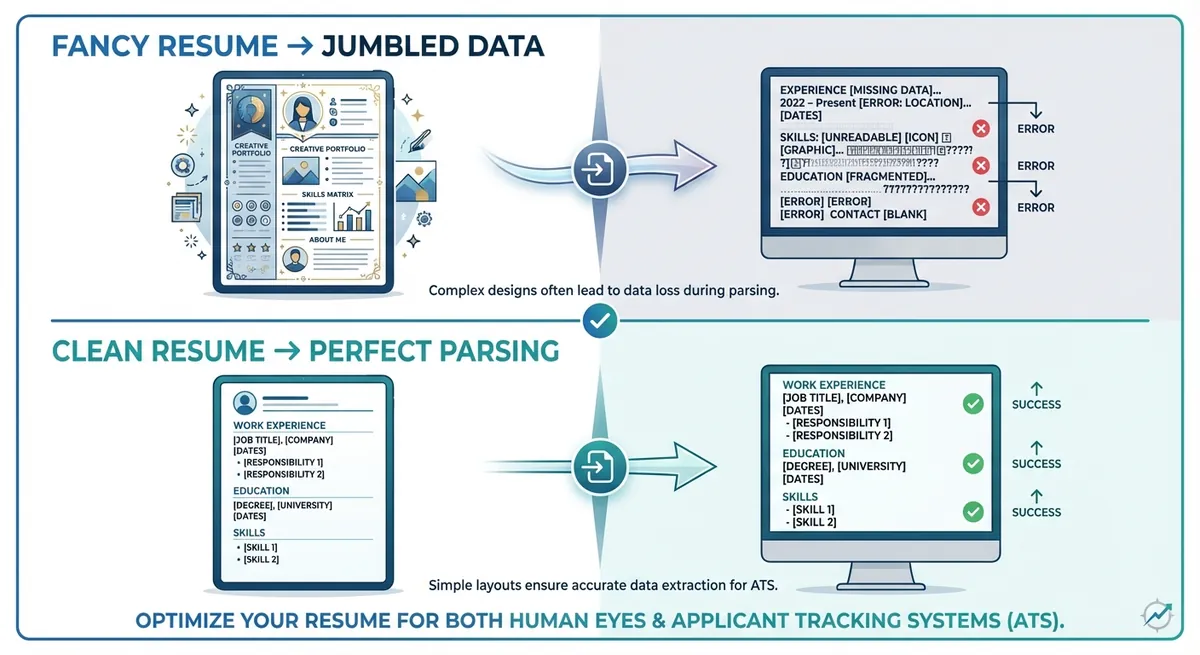
Visual comparison showing a 'Fancy' resume on the left with arrows pointing to a 'Parsed' text file on the right that is jumbled and missing data, contrasted with a 'Clean' resume parsing perfectly
Standard vs. Creative
Here is a quick breakdown of what works and what doesn't.
| Feature | Human Friendly | ATS Friendly |
| :--- | :--- | :--- |
|---|---|---|
| File Type | PDF or Creative Portfolio | Word (.docx) or PDF |
| Layout | Multiple columns, unique flow | Single column, top-down |
| Headings | "My Journey", "About Me" | "Work Experience", "Education" |
| Fonts | Custom scripts | Arial, Calibri, Roboto |
| Graphics | Logos, charts, headshots | None (text only) |
How do keywords determine your fate?
If your resume lacks the specific skills and job titles found in the job posting, the system scores you low and you won't be seen.
You need to speak the robot's language. This is how you beat the ATS without cheating.
exact matching matters
Let's say the job description asks for "Project Management." You write "Managed various projects." A human knows that is the same thing. A basic ATS might not.
Our recent data shows 73% of hiring managers prioritize exact keyword matches when setting their ATS filters.
You need to mirror the language in the job post. If they say "SaaS Sales," don't just say "Software Selling." use the exact phrase. Don't lie, obviously. But if you have the skill, use their word for it.
Job titles can be tricky
Companies use weird titles sometimes. You might be a "Customer Happiness Guru" at your current startup. But the new job is looking for a "Customer Service Representative."
The ATS is looking for the standard title. If you don't have it, you might get skipped.
You can verify standard job titles at the Bureau of Labor Statistics: Occupational Outlook Handbook. It helps to see what the industry standard is. If your title was weird, put the standard equivalent in parentheses next to it. For example: Customer Happiness Guru (Customer Service Representative).
Don't stuff keywords
Some people try to trick the system. They copy the whole job description and paste it in white text so it's invisible to humans but readable to bots.
Don't do this.
Modern systems can detect this. Plus, if you do get past the bot, a human eventually reads it. If they see you keyword stuffing, they will reject you for being dishonest. It's not worth it.
Instead, weave the keywords naturally into your bullet points. If you need help crafting these bullets, our Resume Builder has suggestions that are already optimized for this.
Key Takeaways
- Keep it simple. Use a clean, single-column layout without headers, footers, or graphics.
- Format for robots first. Use standard fonts and save your file as a .docx or PDF to ensure the parser can read it.
- Mirror the job description. Use the exact keywords and skills listed in the ad to create an ATS friendly resume.
- Standardize your headings. Use clear section titles like "Experience" and "Education" rather than creative alternatives.
- Test it. Don't guess. Check if your resume is readable before you apply.
Ready to beat the bot?
The job market is tough enough without technology working against you. Don't let a formatting error cost you an interview.
Use OneTwo Resume to scan your current document or build a new, perfectly optimized one from scratch. Let's get you hired.