You send off your application. You wait. And then... silence.
It’s frustrating. Actually, it’s worse than frustrating. It’s demoralizing. You know you are qualified for the job. You have the skills. You have the experience. So why aren't they calling you back?
Here is the cold truth. A human probably never saw your resume.
It was likely filtered out by a piece of software before it ever reached a hiring manager's inbox. We call this the Applicant Tracking System, or ATS. And if your document isn't optimized for it, you are basically shouting into the void.
ATS software rejects resumes that use unreadable formatting, confusing layouts, or lack the specific keywords that match the job description.
But don't panic. Beating this system is not rocket science. It just requires knowing the rules of the game.
What goes wrong during the resume parsing process?
Parsing software strips your document down to raw text. If you use complex layouts or graphics, the machine often reads gibberish instead of your actual skills.
Think of the ATS as a very literal, very uncreative reader. It doesn't care about your pretty fonts. It doesn't care about your cool sidebar with the skill bars. It cares about data.
When you upload your file, the system performs resume parsing. This means it tears your document apart and tries to sort the information into digital buckets. Name. Phone number. Work history. Education.
If you have your contact information hidden in a header or footer, many older systems won't see it. Period. If you use a creative layout with text boxes, the parser might read the text out of order. Suddenly, your "Project Manager" role looks like it belongs to a job you held ten years ago.
Look, we get it. You want to stand out.
But standing out visually often means becoming invisible digitally. To get past this first gatekeeper, you need a clean, standard format. This is the foundation of an ATS friendly resume. It prioritizes readability over style.
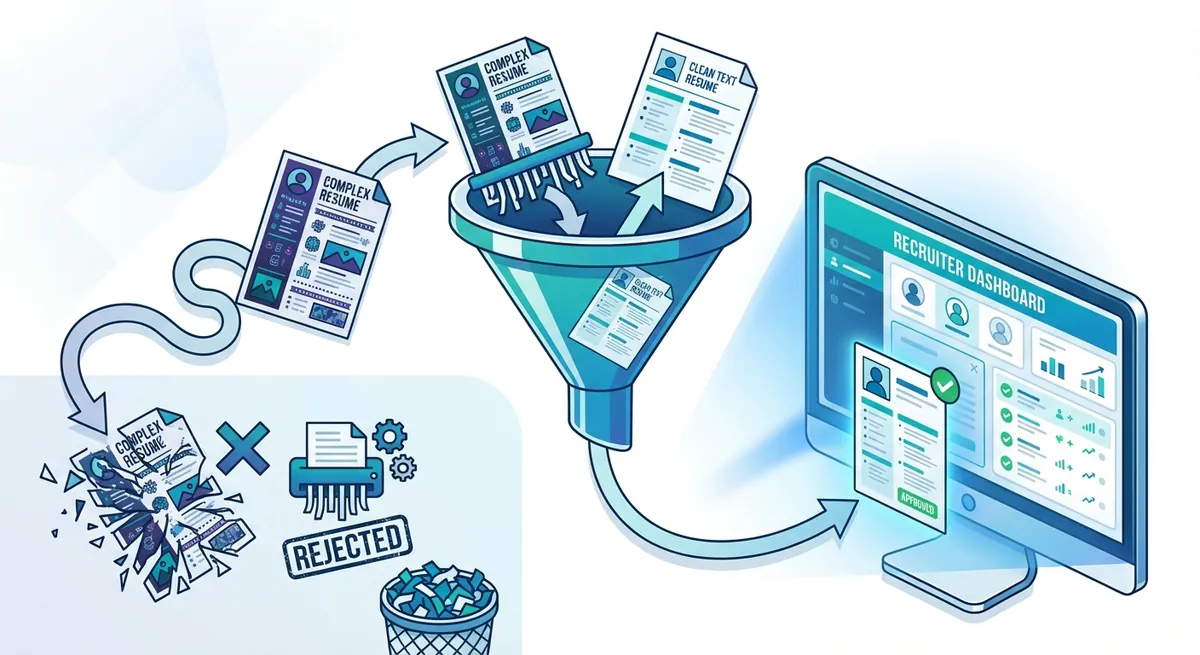
Visual flowchart showing a resume going into a funnel. One path shows a complex resume getting 'shredded' or rejected. The other path shows a clean text resume passing through to a computer screen labeled 'Recruiter Dashboard'.
According to Indeed Career Advice, these systems are designed to scan for specific criteria to help recruiters narrow down the pool. If the parser gets confused, it doesn't ask for clarification. It just moves on to the next candidate.
Are fancy designs actually killing your chances?
Graphics, columns, and text boxes are frequently invisible to older parsing systems. A simple, clean layout ensures your qualifications actually get indexed.
We love good design. But an applicant tracking system does not.
Here is a massive issue we see constantly. Columns. Humans read columns top-to-bottom, then left-to-right. Many parsing bots read strictly left-to-right, all the way across the page.
If you have a two-column resume, the bot might mash your "Skills" section together with your "Experience" section. The result is a garbled mess that makes no sense.
That is a lot of wasted opportunity.
Also, avoid tables. While they look neat to the human eye for organizing skills, the underlying code in a Word document or PDF can trip up the scanner. Stick to standard bullet points. They work. They are safe.
If you aren't sure if your current format is readable, you should check. You can run your document through our Resume Checker to see exactly what the bots are seeing.
How do keywords impact your ranking?
It is not about spamming words in white text. It is about matching your specific hard skills to the exact phrasing found in the job description.
Okay, so your formatting is clean. The bot can read your text. Now, what is it looking for?
Keywords.
But wait. Don't just stuff your resume with buzzwords. That is an amateur move. The algorithms are smarter than that now. They look for context.
If the job description asks for "Project Management," and you write "Managed projects," you might be okay. But you are safer using the exact phrase. If they ask for "Adobe Photoshop" and you just list "Graphic Design Software," you might get passed over.
Truth is, you need to speak the employer's language. If you are struggling to find the right standard terms for your industry, the Occupational Outlook Handbook is a great resource for finding standard job titles and duties.
Here is a quick breakdown of how a human reads versus a machine:
| Feature | How Humans Read It | How ATS Reads It |
| ---------- | ---------- | ---------- |
|---|---|---|
| Graphics | "Wow, nice chart!" | (Blank space or error code) |
| Columns | Separated sections | Jumbled sentences read across the page |
| Acronyms | Understands context | May not recognize if not defined |
| Typos | Might forgive small errors | Can result in a total keyword mismatch |
Make sure your job titles are standard. If your official title was "Chief Happiness Officer" but you did HR work, put "Human Resources Manager" in parentheses. You need the ATS friendly resume to recognize what you actually did.
Does file type matter?
While modern systems handle PDFs well, Word documents (.docx) remain the safest bet for older parsing software to avoid text scrambling.
This is a debate that pops up a lot. PDF preserves your design perfectly. It locks everything in place. That is great for the human eye.
However, some older ATS platforms still struggle to scrape text from a PDF. It's getting better every year. But if you want to be 100% safe? Use a Word document (.docx).
If the application portal specifically says "PDF preferred," go for it. If it doesn't specify, or if the portal looks like it was built in 1998, stick to Word.
It is better to be safe than rejected.
If you are worried about messing up the formatting while trying to make it "bot-safe," don't stress. You can use our Resume Builder to create a version that looks good to humans but is structured perfectly for the machines.
Key Takeaways
- Keep it simple. Avoid columns, text boxes, tables, and graphics. The ATS can't read them.
- Use standard headings. Stick to "Experience," "Education," and "Skills." Don't get cute with "My Journey."
- Match your keywords. Analyze the job description and mirror the exact language for hard skills.
- Watch your file type. When in doubt, a .docx file is the safest option for parsing.
- Don't hide info. Put contact details in the main body of the document, not the header or footer.
Creating an ATS friendly resume isn't about deleting your personality. It's about making sure your personality actually gets a chance to be seen. You have to get past the bouncer to get into the party.
Once you optimize for the bot, you're free to impress the human.