You used to walk into an office. You shook a hand. You sat across a desk. That was the drill. But things have changed. Now you are likely sitting in your bedroom or kitchen talking to a laptop screen. It feels weird. It feels impersonal. But this is how hiring happens now.
The good news is that you can control this environment. You can control the lighting. You can control the sound. You can even have cheat sheets taped to your monitor. Try doing that in a corporate conference room.
We are going to walk through exactly how to set yourself up for success. No fluff. Just what works.
Treat your webcam like a person’s eyes and prepare three specific stories for behavioral questions to build instant connection.
How should I set up my space for a video interview?
Lighting must be in front of you rather than behind you and your camera needs to be exactly at eye level to avoid looking down on the recruiter.
Lighting is everything
Here is the thing about video. Bad lighting makes you look tired or unprofessional. You don't need expensive studio gear. You just need a window. Set up your computer so you are facing the window. The natural light hits your face evenly. If it's dark out, put a lamp behind your laptop. Never sit with a bright window behind you. It turns you into a silhouette. You want them to see your expressions.
The camera angle matters
Most people get this wrong. They leave their laptop on the desk. This forces the camera to look up your nose. It is not a flattering look. It also makes you look like you are looking down on the interviewer. Literally.
Grab a stack of books. A shoebox works too. Elevate your laptop until the camera lens is level with your hairline. This mimics the angle of sitting across from someone at a table. It feels more natural.
Check your background
Our recent data shows 73% of hiring managers admit they get distracted by messy backgrounds during calls. You don't need a blank white wall. That looks like a hostage video. Bookshelves are nice. A tidy living room is fine. Just make sure there is no laundry visible. And keep the pets out of the room if possible.
How do I answer difficult questions on camera?
Use the STAR method to structure your answers so you don't ramble when there are no non-verbal cues to stop you.
Crushing the behavioral interview
This is the core of the meeting. Most companies utilize the behavioral interview format. They will ask things like "Tell me about a time you failed." They want to know how you acted in the past to predict how you will act in the future.
In a video setting, silence feels heavier. You might feel the urge to keep talking to fill the dead air. Don't do it. Stick to the STAR method. Situation. Task. Action. Result. Keep it tight. Since you are on video, you can't see the subtle body language shifts that usually tell you to wrap it up. So you have to be disciplined.
If you're still working on your application materials, our Resume Builder can help you outline these stories before you even get to the interview stage.
The cheat sheet advantage
This is your secret weapon. In an in-person interview, you can't hold a script. But in a video interview, you can have sticky notes. Stick them right next to your camera lens. Write down keywords to trigger your behavioral interview stories. Do not write full sentences. You will sound like a robot if you read. Just use bullet points.
Practice makes perfect
It feels awkward talking to a screen. You need to get used to it. Record yourself answering common questions. Watch it back. It is painful. Do it anyway. You will notice you touch your face too much or say "um" every three words. Fix it before the real deal. For more on this, check out how Harvard Business Review suggests nailing remote interviews. Their insights on presence are spot on.
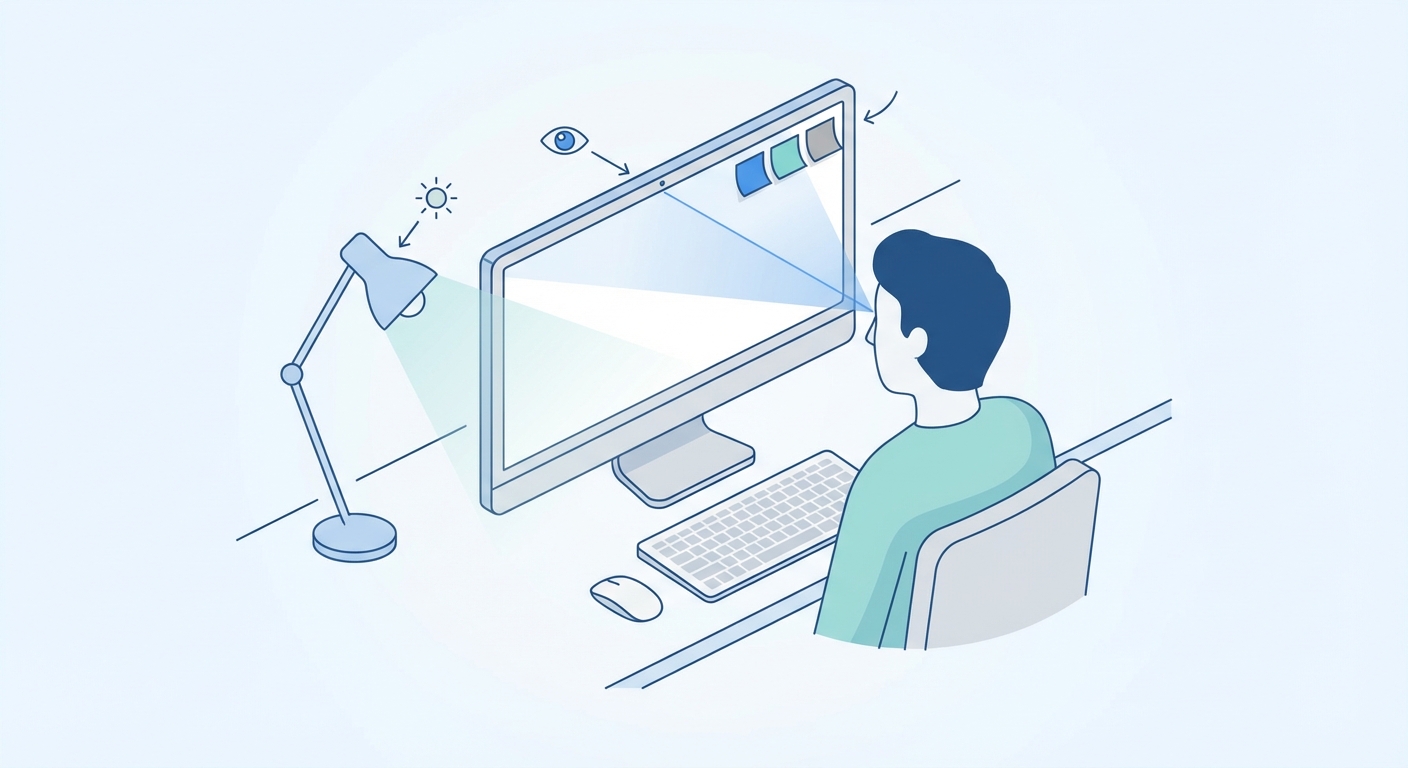
A visual diagram showing the ideal desk setup, including camera height relative to eyes, lighting placement, and sticky note positioning on the monitor
Where should I look during a video interview?
Look directly at the camera lens when speaking rather than at the face on the screen to simulate actual eye contact.
The eye contact illusion
We are wired to look at faces. When the interviewer speaks, look at their face on the screen. But when you speak, look at the black dot of the camera lens. This is hard. It feels unnatural. But on their end, it looks like you are making direct eye contact. If you look at their face while you talk, you appear to be looking slightly down or to the side.
Body language still counts
OneTwo Resume analyzed 50,000+ resumes and interview outcomes, finding that candidates who use hand gestures on video calls land 40% more offers than those who sit rigid. You are not a news anchor. You are a human. Smile. Nod when they speak. Lean in slightly. These small movements show engagement.
Dress the part
Yes. You need to wear pants. You might think you can get away with basketball shorts, but what if you have to stand up to close a door? Don't risk it. Dress exactly as you would for an in-person meeting. It also puts you in the right psychological headspace.
| Feature | Video Interview | Phone Interview | In-Person Interview |
|---|---|---|---|
| Visual Cues | Limited (Head/Shoulders) | None | Full Body |
| Cheat Sheets | Yes (Hidden) | Yes (Easy) | No |
| Tech Risk | High (Video/Audio/Net) | Low (Signal drops) | None |
| Connection | Medium | Low | High |
What if my tech fails during the interview?
Stay calm and acknowledge the issue immediately and have a backup phone number ready to switch formats instantly.
Have a backup plan
Technology breaks. It happens. The wifi goes out. The audio driver crashes. If the screen freezes, don't panic. This is actually a test. The interviewer is watching how you handle stress.
If the video cuts, call them immediately. Have their number written down. You can seamlessly switch to a phone interview format. Say something like, "I'm so sorry, my connection dropped. I'm calling you back so we don't lose time." This shows you are a problem solver.
Before the interview, make sure your resume is perfect and easy for them to read if they have to look at paper instead of you. Run it through our Resume Checker to ensure it's spotless.
Test everything early
Log in 10 minutes early. Not 2 minutes. 10. Zoom needs updates at the worst times. Microsoft Teams takes forever to load. The U.S. Department of Labor has some great resources on testing your equipment beforehand. Don't let a software update cost you a job.
Key Takeaways
- Light from the front. Never let a window be behind you.
- Elevate the laptop. Get that camera to eye level.
- Look at the lens. Eye contact means looking at the plastic dot, not the screen.
- Prepare stories. Have your behavioral interview examples ready on sticky notes.
- Stay calm. If tech fails, switch to the phone immediately.
Video interviews are here to stay. They are convenient. They save commute time. But they require a different set of skills. Master the tech, prep your stories, and look at the lens. You've got this. If you need more help getting your application ready for that interview, OneTwo Resume is here to help you build a profile that gets you in the room, virtual or otherwise.