It used to be that a firm handshake was the best way to start a meeting. Now it’s checking your microphone settings five minutes before the call starts. The world has changed. And the way we get hired has changed with it.
Video interviews are standard now. They aren't just a screening tool anymore. They are the main event. You might be comfortable FaceTiming your mom. But sitting in front of a hiring manager on Zoom is a different beast entirely. It feels awkward. It feels artificial.
Look, the good news is that the bar is surprisingly low. Most candidates have bad lighting. They look at their own face instead of the camera. They ramble.
If you can master the technical and behavioral sides of this format, you automatically stand out. You want to know how to ace an interview from your living room? It starts here.
Treat the camera lens like a person’s eyes, test your tech an hour early, and curate a tidy background that shows professionalism without distractions.
Is your technical setup hurting your chances?
Lighting should always be in front of you rather than behind, and clear audio quality matters significantly more to interviewers than 4K video resolution.
The Lighting Situation
Lighting is everything. Seriously. It’s the difference between looking like a professional and looking like you are broadcasting from a cave. You don't need expensive studio gear. You just need a window.
Set up your laptop so you are facing the window. Natural light is free. It’s flattering. It works. If you can't do that, place a lamp behind your laptop. Just make sure the light hits your face evenly. Never sit with a window behind you. You will turn into a silhouette. The hiring manager wants to see your facial expressions.
Audio Over Video
People will forgive a grainy video. They won't forgive bad audio. If they have to strain to hear your answers, they will stop listening. It is human nature.
Use headphones with a built-in microphone. The built-in mic on your laptop usually picks up too much echo. It sounds hollow. A simple pair of earbuds works wonders.
Here's a stat for you.
Don't let a cheap mic cost you a paycheck.
Background Check
Check what is behind you. Is it a pile of laundry? An unmade bed? A poster from college?
Clean it up. You want a neutral background. A bookshelf is great. A blank wall is fine. You want the interviewer to focus on your words. Not your messy room. If you can't clean it, use a blurred background filter. It’s better than the alternative.
How do you prepare your content for the screen?
Don't read a script off your screen, but do keep sticky notes near the camera lens to remind you of specific metrics and the STAR method structure.
The STAR Method
Structure saves you from rambling. When you get asked behavioral interview questions like "Tell me about a time you failed," you need a plan. Use the STAR method. Situation. Task. Action. Result.
It keeps your story tight. It ensures you actually answer the question.
Start with the context. Explain the challenge. Describe what you did. End with the outcome. This is a core component of how to ace an interview regardless of the format. But on video, it is even more important because non-verbal cues are harder to read. You can't rely on your charm alone.
If you need help structuring your experience before the call, you might want to use our Resume Builder. It helps you organize your achievements in a way that aligns perfectly with this storytelling format.
Cheat Sheets
Here is the biggest advantage of a video interview. You can cheat. Sort of.
You can have notes. But be careful. Do not write out full sentences. You will sound like a robot. Write down keywords. Bullet points. Numbers.
Stick a Post-it note right next to your webcam. This keeps your eyes up. It keeps you focused. If you look down at a notebook, you break the connection. If you have a document open on your screen, put it at the top center. Close everything else. You don't want a slack notification popping up mid-sentence.
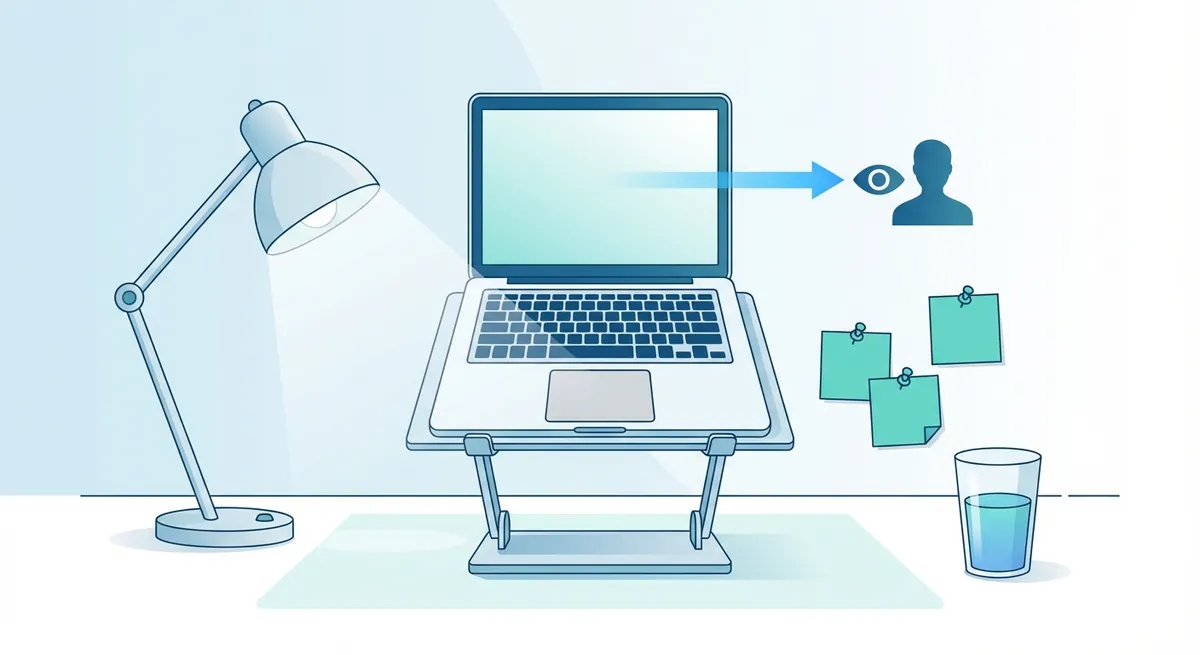
Visual diagram showing the ideal desk setup, including laptop height, light source positioning, sticky note placement, and water glass location
Mock Interviews
Practice makes perfect. Record yourself answering common questions. Watch it back. It will be painful. Do it anyway.
Are you saying "um" too much? Are you fidgeting? Are you looking at the camera?
According to the Harvard Business Review, looking directly at the camera is the only way to simulate eye contact. It feels unnatural. But on the other end, it looks like you are looking right at them.
Where should you actually look?
Look at the camera lens for 90% of the conversation to create eye contact, and nod slowly to show active listening without interrupting the audio stream.
The Eye Contact Paradox
This is the hardest part. You want to look at the person's face on the screen. But if you look at their face, you appear to be looking down.
To the interviewer, it looks like you are disengaged.
Train yourself to stare at the black dot of your webcam. It feels weird. It feels like you are talking to a wall. But this is the secret to how to ace an interview remotely. It builds trust. It shows confidence.
Body Language
sits up straight. Lean forward slightly. This shows interest. Don't cross your arms. It looks defensive.
And smile. Seriously. Video calls flatten your personality. You have to overcompensate a little bit. Smile more than you usually would. Nod to show you are listening.
Audio lag is real. If you say "mhm" or "yeah" while they are talking, you might cut out their audio. It’s annoying. Use visual cues instead. Nodding is your best friend here.
Dress the Part
Yes. You need to wear pants.
Truth is, dressing up puts you in the right mindset. If you wear sweatpants, you might feel too relaxed.
Wear what you would wear to the office. Solid colors work best. Avoid busy patterns. They can create a weird strobe effect on camera. For more tips on visual presentation and etiquette, check out this guide on Indeed.
How does this differ from other formats?
Video interviews require more visual engagement than phone calls but demand more exaggerated non-verbal cues than in-person meetings due to the lack of physical presence.
The Comparison
It helps to know what you are dealing with. A phone interview is about voice modulation. An in-person interview is about vibe. A video interview is a mix of both, plus technical support.
Here is a breakdown:
| Feature | Video Interview | Phone Interview | In-Person Interview |
|---|---|---|---|
| Eye Contact | Look at the camera lens | Irrelevant | Look at the interviewer |
| Body Language | Visible from chest up | Irrelevant | Full body visible |
| Cheat Sheets | Possible (sticky notes) | Very easy | Impossible |
| Tech Risk | High (Internet, Audio, Video) | Low (Signal only) | None |
| Dress Code | Professional (at least top half) | Casual | Full Professional |
Make sure your resume matches the story you are telling on camera. If you aren't sure if your resume is up to par, run it through our Resume Checker before the call. It catches the small errors that might trip you up during the questioning phase.
Key Takeaways
- Test Everything: Check your internet, audio, and video 30 minutes before start time.
- Light It Up: Face a window. Don't sit in the dark.
- Look at the Lens: It feels weird, but it looks right to them.
- Use the STAR Method: Keep your answers structured and concise.
- Dress Up: Wear real pants. It helps your mindset.
There is no magic trick here. It’s just preparation. If you control the environment and the tech, you can focus on showing them why you are the best person for the job. Good luck. You’ve got this.