You have spent hours agonizing over your work history. You have tweaked your bullet points until they sound perfect. But there is one thing that might ruin your chances before a hiring manager even reads a single word. It’s your formatting.
Here’s the thing. Formatting isn't just about making things look pretty. It is about readability. It is about psychology. And most importantly, it is about passing the automated robots that guard the gate. If you are figuring out how to write a resume that actually gets results, you need to master the visual side just as much as the content.
We are going to strip away the confusion. No complex design theories. Just the practical advice you need to get hired.
The best resume format is clean, consistent, and uses a standard font between 10 and 12 points with one-inch margins all around.
What are the best fonts to use right now?
Stick to standard sans-serif fonts like Arial or Calibri for a modern look, or classic serif fonts like Garamond for traditional industries.
The Serif vs. Sans-Serif Debate
Look, this isn't a design contest. You want clarity. Sans-serif fonts (smooth letters without the little feet) are generally seen as cleaner and more modern. They are great for tech, startups, and creative roles. Think Arial, Calibri, or Helvetica.
But serif fonts have their place. If you are applying to a law firm or a conservative academic institution, Times New Roman or Garamond signals tradition and reliability. Just be careful. Times New Roman can sometimes look a bit dated. Try Georgia if you want a serif font that looks good on screens.
Size Matters
It is tempting to shrink your font to fit everything on one page. Don't do it. Truth is, if a recruiter has to squint, they will stop reading. Keep your main text between 10 and 12 points. Your headers can go up to 14 or 16 points to create a clear structure. If you are struggling to fit your text, it is better to cut fluffy adjectives than to reduce the font size to microscopic levels.
For a deeper dive on typography choices, you can read what Indeed Career Advice - The Best Fonts for Your Resume has to say about specific font psychology.
Consistency is King
Pick one font for your body text. Pick one for your headers. That is it. Mixing three or four different typefaces makes your document look cluttered and unprofessional. If you want to see how different font pairings look without doing the manual work, our Resume Builder lets you toggle between professional styles with one click.
How should you structure the page layout?
Use plenty of white space to guide the reader's eye and stick to reverse-chronological order unless you have a very specific reason not to.
The Importance of White Space
White space is your friend. It gives the reader's eyes a break. It creates a sense of organization. When you cram text into every square inch, the document looks dense and intimidating. It implies you don't know how to edit yourself.
5-inch margins. That is a significant difference. Give your content room to breathe.
Margins and Alignment
Keep your text left-aligned. Justify alignment (where text stretches to both edges) creates weird gaps between words that can be distracting. As for margins, keep them at one inch on all sides. You can cheat down to 0.7 inches if you absolutely must, but never go lower. It looks messy.
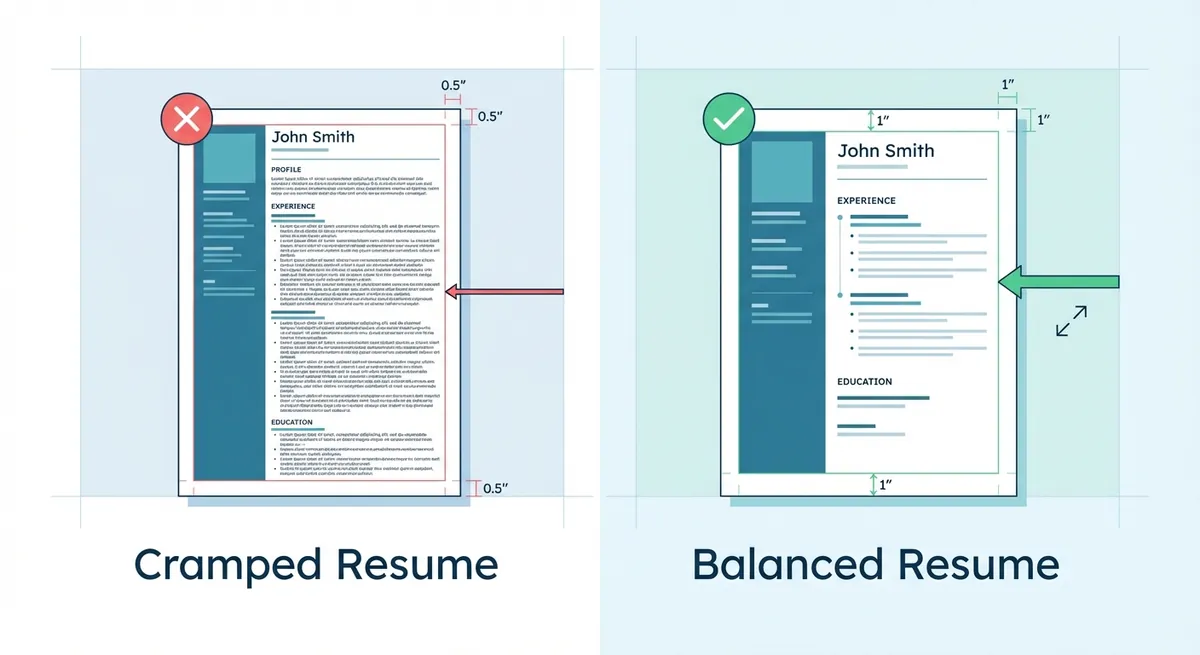
A visual comparison showing two resumes side-by-side. The left side is 'Cramped' with 0.5 margins and small font, labeled with a red X. The right side is 'Balanced' with 1-inch margins and clear headers, labeled with a green checkmark. Annotations point out specific areas of white space usage.
Modern vs. Traditional Layouts
When learning how to write a resume, many people ask about creative layouts. Should you use two columns? A sidebar? Here is the rule of thumb. If you are a graphic designer, a creative modern resume format is expected. For everyone else, a standard single-column layout is safer. (Software engineers have a well-known free option: Jake's Resume, a single-column LaTeX template.) It parses better for software and is easier for humans to scan quickly.
Will an ATS be able to read your formatting?
Automated Tracking Systems often struggle with columns, graphics, and text boxes, so keep your underlying formatting simple to ensure you get ranked.
The Hidden Robot Test
Most large companies use an Applicant Tracking System (ATS). These bots scan your resume before a human ever sees it. If your formatting confuses the bot, your application goes into the digital void. We see this happen all the time.
You might have the best experience in the world. But if the robot can't read it, you don't exist.
What to Avoid
Do not use text boxes to hold your contact info. Do not use graphics to show your skills (like those progress bars that say "90% leadership"). The ATS reads text. It cannot read a picture of a bar chart. Keep it text-based. If you are unsure if your current file is readable, run it through our Resume Checker to get a compatibility score.
File Formats
Save your resume as a PDF unless the job description specifically asks for a Word Doc. A PDF locks your formatting in place. What you see is what they see. Word documents can shift around depending on the version of software the recruiter is using. For more technical specs on file types, check out CareerOneStop (U.S. Department of Labor) - Format Your Resume.
Here is a quick breakdown of what is safe and what is risky:
| Formatting Element | ATS Safe? | Human Readable? |
|---|---|---|
| Standard Bullets | Yes | High |
| Text Boxes | No | Medium |
| Columns | Sometimes | High |
| Tables | No | Medium |
| Bold/Italics | Yes | High |
| Graphics/Icons | No | Low |
How do you highlight the most important info?
Use bold text selectively to draw attention to metrics and job titles, but avoid underlining as it makes the document look cluttered.
Skimmability is the Goal
Recruiters spend about six seconds on their initial scan — 6 seconds in Ladders' 2012 eye-tracking study and 7.4 in its 2018 update (sources). They are looking for titles, companies, and dates. If they can't find those in three seconds, they move on. Use bold text for your job titles. It acts as an anchor for the eye.
But don't overdo it. If everything is bold, nothing is bold.
Bullet Point Strategy
We have looked at thousands of best resume examples and they all share one trait. Their bullet points are concise. Try to keep each bullet to one or two lines max. If a bullet point turns into a paragraph, you have lost the reader.
Start each bullet with a strong action verb. Focus on achievements, not just duties. And use numbers. Numbers stand out visually in a wall of text.
Section Headers
Make your headers clear. "Experience," "Education," "Skills." Don't get cute with headers like "My Journey" or "Professional DNA." The recruiter is scanning for specific keywords. Help them find what they are looking for.
This is a huge part of how to write a resume effectively. You are designing a user experience for the recruiter. Make it easy for them to say yes.
Key Takeaways
- Keep it clean. Use 10-12 point font and standard typefaces like Arial, Calibri, or Garamond.
- Mind the margins. 1-inch margins are the sweet spot. White space helps you look organized.
- Ditch the graphics. Text boxes, columns, and icons can confuse ATS software. Stick to text.
- File type matters. Send a PDF to ensure your formatting stays locked, unless told otherwise.
- Use bold wisely. Highlight titles and key metrics, but don't bold entire sentences.
Formatting is the foundation of your application. Get it right, and your content will shine. If you want to skip the headache of setting margins and choosing fonts manually, give OneTwo Resume a try today. We handle the design so you can focus on the career move.