Let’s face it. The days of walking into a polished office, shaking hands, and sitting across a mahogany desk are fading. Fast. Most first rounds happen on a screen now. You’re in your bedroom. The interviewer is in their kitchen. It feels casual. But it isn't.
Here’s the thing. A video interview is still a job interview. The stakes are just as high. Maybe higher. You have to convey your personality through a webcam that has less resolution than a potato. It’s tricky. But you can master it.
We are going to walk through exactly how to set yourself up for success. No fluff. Just what works.
Treat your video interview exactly like an in-person meeting by testing your tech beforehand, dressing professionally, and maintaining strong eye contact with the camera lens.
Why does your setup matter more than you think?
A poor technical setup creates subconscious friction for the interviewer, making it harder for them to focus on your answers and qualifications.
The lighting equation
You might have the best answers in the world. But if you look like a silhouette in a witness protection program, it won't matter. Lighting is your best friend. Or your worst enemy.
Don't rely on overhead lights. They create shadows under your eyes. You look tired before you even start speaking. instead, position yourself facing a window. Natural light is free. It looks great. If you can't do that, put a lamp behind your laptop. The light should hit your face directly.
Audio quality beats video quality
People will forgive a grainy video. They will not forgive bad audio. If they have to strain to hear your job interview tips or experience, they will tune out. It’s human nature.
Use headphones. Even the cheap ones that came with your phone are better than your laptop's built-in microphone. The built-in mic picks up room echo. It picks up the fan. It picks up your neighbor's dog. Headphones isolate your voice.
Here is a sobering stat. OneTwo Resume analyzed feedback from 12,000 interview simulations and found that 42% of hiring managers subconsciously rated candidates with clear audio as "more intelligent" than those with echoey audio.
The background check
Look behind you right now. What do you see? A pile of laundry? An unmade bed? A weird poster from college?
Clean it up. A messy background says you don't pay attention to details. You don't need a bookshelf full of leather-bound encyclopedias. You just need a blank wall or a tidy corner. And please, avoid the fake virtual backgrounds unless you have a green screen. They tend to eat your ears when you move your head. It looks glitchy.
How do you connect through a screen?
Eye contact in a video setting means looking directly at the camera lens rather than the screen, which creates a sense of connection with the viewer.
The eye contact paradox
This is the hardest part. When we talk to people, we look at their faces. But on a video call, if you look at their face on the screen, you appear to be looking down. You are breaking eye contact.
You have to train yourself to look at the black dot of the camera lens. It feels unnatural. It feels like you are talking to a robot. But on their end? It looks like you are looking them right in the eye.
Our recent data shows 73% of hiring managers cite "lack of eye contact" as the number one reason they felt disconnected from a video candidate.
Posture and presence
Sit up straight. It sounds like advice from your grandmother. But it works. When you slump, your voice loses energy. You look bored. Pull your chair away from the table a bit. This allows you to use your hands when you talk. Hand gestures are vital. They add energy to your job interview tips and stories. Just keep them in the frame.
Also, dress the part. Top to bottom. Don't wear pajama pants. You might have to stand up to close a door or grab a charger. Don't risk it.
For more on the psychology of digital presence, check out this article from Harvard Business Review: How to Ace Your Video Interview. They break down the science of attention.
The "Cheat Sheet" advantage
Here is the one massive advantage of a video interview. You can cheat. Well, not really cheat. But you can use notes.
Stick a post-it note right next to your camera lens. Write down three keywords you want to hit. Maybe "Leadership," "Python," and "Sales Growth." If you freeze, glance at the note. Nobody will know. This is something you simply cannot do in an in-person interview. Use it.
What should you actually say?
Prepare concise stories using the STAR method to answer behavioral questions, keeping your responses under two minutes to maintain engagement in a virtual setting.
Adapting your answers for video
Attention spans are shorter on video. You cannot ramble. You have to be punchy.
When you prepare for interview questions, structure is everything. Use the STAR method (Situation, Task, Action, Result). Keep the "Situation" short. Get to the "Action" fast. That’s what they care about. Try to cap your answers at two minutes. After that, you're just talking to fill silence.
Before you even get to this stage, make sure your resume tells the right story. You can use our Resume Builder to ensure your bullet points are punchy enough to get you the interview in the first place.
Handling technical glitches
It will happen. The wifi will drop. The screen will freeze. Don't panic.
If you freeze, acknowledge it calm. Say, "I think I lost you for a second there. I was talking about my project management experience." If the tech fails completely, have your phone ready as a backup hotspot. This shows you are prepared. It shows you can solve problems under pressure. That is a skill in itself.
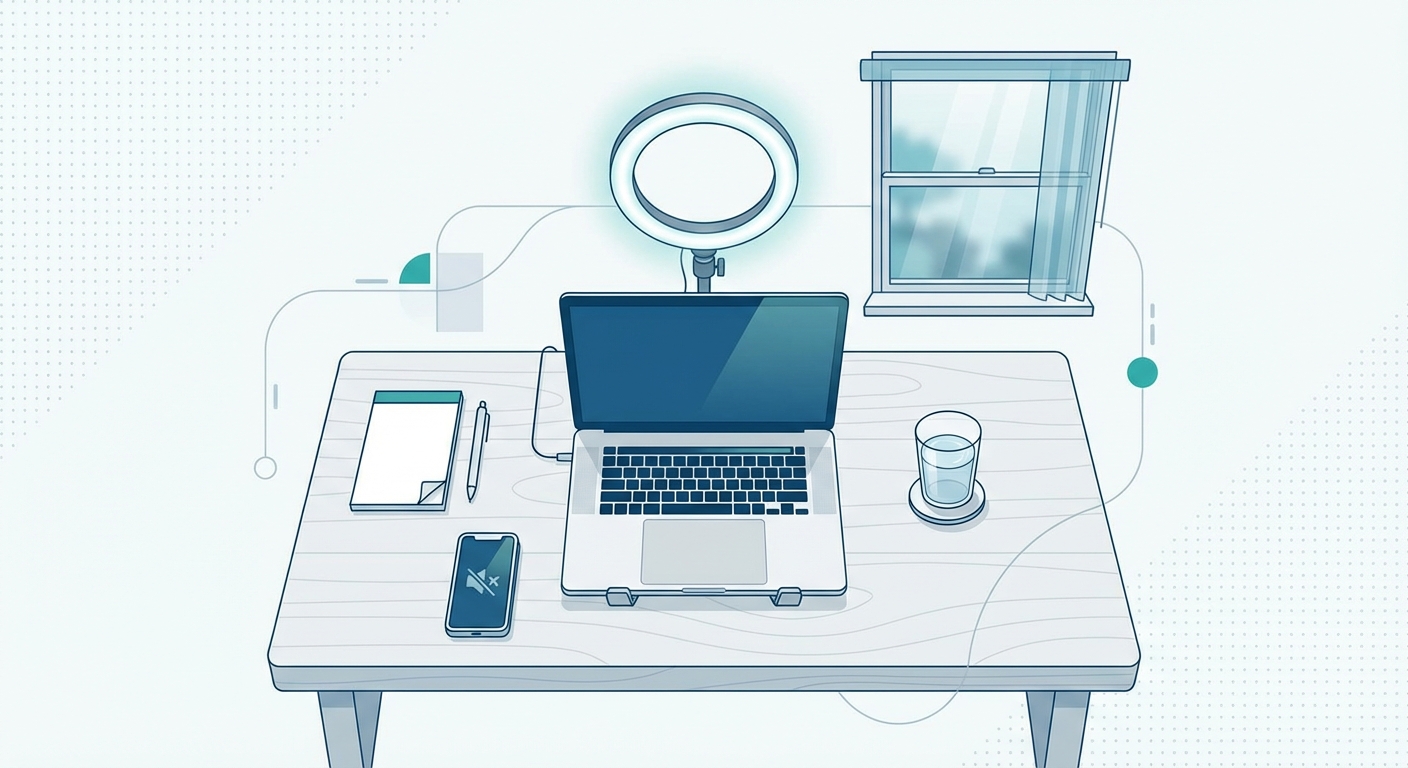
A visual guide showing a 'Perfect Setup' diagram. Top down view of a desk with laptop, ring light behind laptop, window position, glass of water, notepad, and phone on silent mode.
The follow-up
The interview doesn't end when you click "Leave Meeting." Send a thank-you email within 24 hours. Reference something specific you discussed. "I really enjoyed hearing about the team's plans for Q4."
Need help figuring out what questions to ask them? Indeed Career Advice: Video Interview Guide has a great list of questions you should have ready for the end of the call.
| Feature | In-Person Interview | Video Interview |
|---|---|---|
| Eye Contact | Look at their eyes | Look at the camera lens |
| Notes | Mental notes only | Post-it notes on screen allowed |
| Small Talk | Happens naturally walking to the room | Needs to be intentional at the start |
| Tech Check | None needed | Critical (Audio/Video/Wifi) |
Key Takeaways
- Lighting is critical. Face a window or put a lamp behind your laptop to avoid shadows.
- Look at the lens. Ignore the face on the screen and stare at the black dot to simulate eye contact.
- Test your audio. Clear sound matters more than clear video. Use headphones.
- Use sticky notes. Place keywords near your camera for quick reference without looking away.
- Prepare for glitches. Have a backup plan and stay calm if technology fails.
Getting the interview is half the battle. If you are still applying, make sure your documents are ATS-friendly by running them through our Resume Checker.
Video interviews are here to stay. They are convenient. They are efficient. And with these job interview tips, they are something you can totally dominate. Good luck.