You spend three hours tweaking your resume. You find the perfect job opening. You hit submit. And then you wait.
Days turn into weeks. Silence.
It feels like you threw your application into a black hole. But it’s not a black hole. It’s a database. And standing between you and a human recruiter is a piece of software called an Applicant Tracking System, or ATS for short.
Here’s the thing. Most people think the ATS is a robot villain designed to reject you. It isn't. It’s actually just a filing cabinet with a very strict librarian. If you don't follow the filing rules, your resume gets lost in the stack.
An Applicant Tracking System scans your document, strips the formatting, and ranks you based on how well your text matches the specific keywords in the job description.
What exactly happens when you hit submit?
The software converts your resume into a digital profile by stripping away design elements to find raw text, a process that determines if you are even searchable.
Most job seekers imagine a hiring manager opening a PDF and reading it top to bottom. That almost never happens. Not at first.
When you apply, the system performs resume parsing. This is the critical moment. The software breaks your document down. It looks for your name. It hunts for your phone number. It tries to categorize your work history into neat little database fields.
If the parsing fails, you don't exist.
Think of it like a translation. You wrote your resume in English. The ATS speaks Database. If you use weird columns or fancy graphics, the translation fails. The computer gets confused. It might think your job title is your phone number. Or it might see a blank page.
OneTwo Resume analyzed 50,000+ resumes and found that 42% contained unreadable contact information simply because it was placed in the header or footer of the document. The system couldn't see it.
After the parsing is done, the system assigns you a relevancy score. This is purely math. It compares the words in your profile to the words in the job description.
But don't panic. You don't need to be a computer scientist to fix this. You just need to keep it simple.
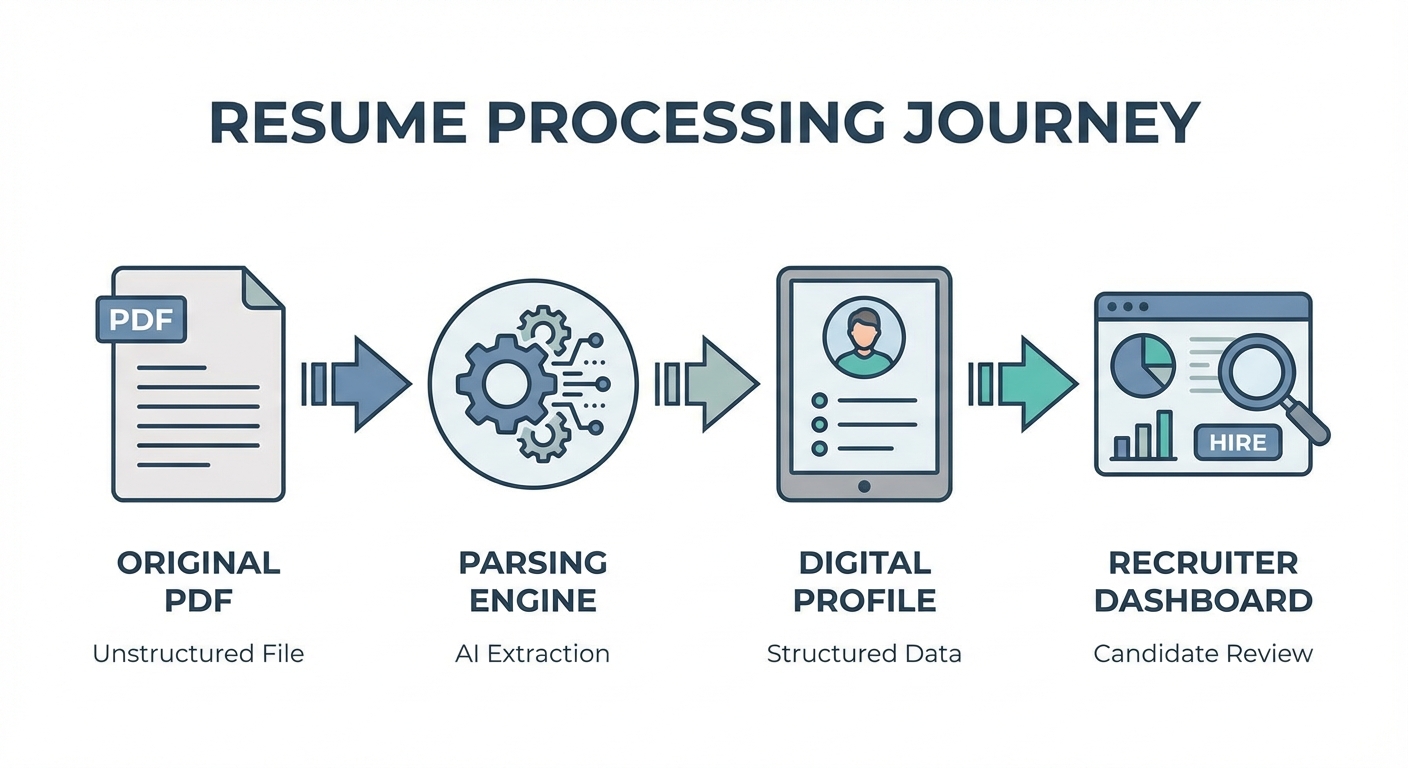
Visual flow showing a resume going from PDF -> Parsing Engine -> Digital Profile -> Recruiter Dashboard
Why does the system reject qualified candidates?
Rejection usually happens because the parsing software cannot read complex layouts or graphics, meaning your actual skills and experience never get indexed in the database.
Truth is, the robot isn't judging your potential. It’s judging your formatting.
Complex designs are the enemy. You might have the best experience in the world. But if you put your skills in a graph or a chart, the resume parsing technology won't read it. It sees an image. It skips it.
Suddenly, you have zero skills according to the system.
This is a major issue in the modern labor market. Harvard Business School released a report on Hidden Workers: Untapped Talent which explains how automated hiring systems accidentally filter out millions of viable candidates. They call it the "gap." If your resume isn't formatted for the machine, you fall right into it.
Here are the most common things that break the system:
- Tables and Columns: Older systems read left-to-right straight across the page. Two columns get mashed together into nonsense.
- Images as Text: Never save your name or headers as an image.
- Uncommon Fonts: Stick to the classics like Arial or Calibri.
And let's talk about file types. Just use a Word doc or a PDF. But be careful with PDFs. Some design programs create PDFs that are just big pictures. The text isn't selectable. If you can't highlight the text with your mouse, the ATS can't read it either.
Want to know if your file is readable? You can run it through our Resume Checker to see exactly what the software sees.
How do you optimize without sounding like a robot?
You need to incorporate specific terms from the job description into your experience section naturally, ensuring both the algorithm and the human recruiter understand your value.
So, how do you beat the ATS? You help it.
Start with resume keywords. These are the specific hard skills and job titles listed in the job posting. If they ask for "Project Management" and you write "Led various initiatives," you lose. The system doesn't know those are the same thing.
But here is a warning. Don't keyword stuff.
Some people try to cheat. They paste the whole job description in white text at the bottom of the page. Does it work? Sometimes. But remember the end goal. A human eventually looks at this. If a recruiter sees a block of invisible text when they highlight your document, you look dishonest. You won't get the interview.
Instead, weave the keywords into your bullet points.
Bad: "Good at coding."
Good: "Developed three apps using Python and Java."
Context matters. Modern resume parsing is getting smarter. It looks for how long you used a skill, not just if you listed it.
If you aren't sure which keywords to pick, look for the nouns. Software names. Certifications. Methodologies. These are what the recruiters type into the search bar.
For a deeper dive on the basics, Indeed explains that these systems are essentially workflow management tools. They make the recruiter's life easier. Your job is to make your resume easy to manage.
Our recent data shows 73% of hiring managers rely solely on the ATS summary screen rather than the original file for their first pass. If your summary data is wrong, you are out.
Check out this comparison of how different formats perform:
| Feature | ATS Friendly | ATS Nightmare |
|---|---|---|
| File Type | .docx or text-based .pdf | .jpg, .png, or Photoshop .pdf |
| Layout | Single column, standard margins | Multiple columns, text boxes |
| Headings | Standard (Work Experience, Education) | Creative (My Journey, Knowledge) |
| Fonts | Arial, Calibri, Roboto, Helvetica | Comic Sans, Papyrus, Custom Script |
| Graphics | None | Headshots, icons, skill bars |
The Bottom Line
An ATS resume isn't about writing for a robot. It is about writing a clear, structured document that a robot can understand so that a human can read it later.
Don't let a bad layout ruin your chances. Keep it clean. Use the right words. And focus on the content.
If you are struggling to build a layout that works, try our Resume Builder. It uses templates that are pre-tested against parsing software to ensure your data gets through every time.
Key Takeaways
- ATS systems filter candidates by parsing text and matching keywords.
- Fancy formatting like columns, graphics, and text boxes can cause automatic rejection.
- Use standard section headings so the software knows where to look.
- Include specific keywords from the job description naturally in your bullet points.
- Always check if your PDF text is highlightable before sending it.
Ready to get your application seen? Stop guessing and start optimizing with OneTwo Resume.