You spend hours tweaking your job application. You finally hit submit. Then you wait. Crickets. It hurts.
Truth is, your application probably never reached a human being. It got swallowed by a machine. You need to know how to beat the ATS before a recruiter ever lays eyes on your file.
An ATS-friendly resume uses standard formatting and clear text so hiring software can actually read and understand your specific skills.
Look, nobody likes writing resumes. But understanding how these systems operate is the only way to stop your applications from going down the drain. Let's talk about how to fix your formatting and get your foot in the door.
What is an applicant tracking system actually doing?
These tracking systems do not read your resume like a human does. They strip away all formatting to parse raw text and filter out unqualified candidates automatically.
The reality of the ATS scanner
When you upload your document, the software scans it. It looks for specific text. Then it categorizes your work history, education, and skills into a digital profile. It sounds brutal. And it is.
In fact, many qualified candidates get tossed out simply because the software could not read their files. A study on Hidden Workers: Untapped Talent by Harvard Business School research shows these systems routinely reject perfectly good applicants just because of formatting quirks or missing terminology.
Why your pretty design is failing
You might think a fancy design makes you stand out. But to a robot, it just looks like garbage.
Those complex templates with multiple columns and fancy graphics confuse the software. It mixes up your job titles with your dates of employment. It jumbles your skills.
Keep it simple. You are writing for a machine first and a human second.
How do you beat the ATS without losing your mind?
You have to give the software exactly what it expects to see. That means using standard section headers and matching the specific terminology used in the job posting.
Getting your resume keywords right
Keywords are just the specific skills and qualifications the employer asked for. You need to include them.
If the job description asks for "project management" and you wrote "managed projects", the software might miss it. You have to be literal. Read the job posting closely. Find the hard skills they want. Then weave those exact resume keywords naturally into your work history.
But do not just stuff words randomly. That is a quick way to annoy the human who eventually reads it.
Keep your formatting dead simple
Everyone wants to beat the ATS. But you don't do it with tricks. You do it with clarity.
Stick to standard headers. Use "Work Experience" instead of "My Career Journey". Use "Education" instead of "Academic Background". The software is programmed to look for those exact phrases.
If you want a deeper look at what makes this specific format tick, the team over at Indeed has a great breakdown on What Is an ATS Resume? to help you understand the basics.
And if you are tired of guessing, you can always use our Resume Builder to generate a format that works right out of the box.
| Resume Element | Bad for Software | Good for Software |
|---|---|---|
| Layout | Two columns, text boxes | Single column, standard margins |
| Fonts | Custom downloaded fonts | Arial, Calibri, Times New Roman |
| File Type | Complex PDF with images | Standard Word Doc or basic PDF |
| Headers | "My Career Journey" | "Work Experience", "Education" |
What does a perfect ATS friendly resume look like?
The ideal template strikes a perfect balance. It feeds the parsing software simple text while remaining visually appealing for the recruiter who ultimately reviews it.
Standard fonts and traditional layouts
An ATS friendly resume doesn't have to be ugly. It just has to be clean.
Use standard fonts like Arial or Calibri. Leave plenty of white space. Bullet points are your best friend. They break up massive walls of text and make your achievements easy to scan.
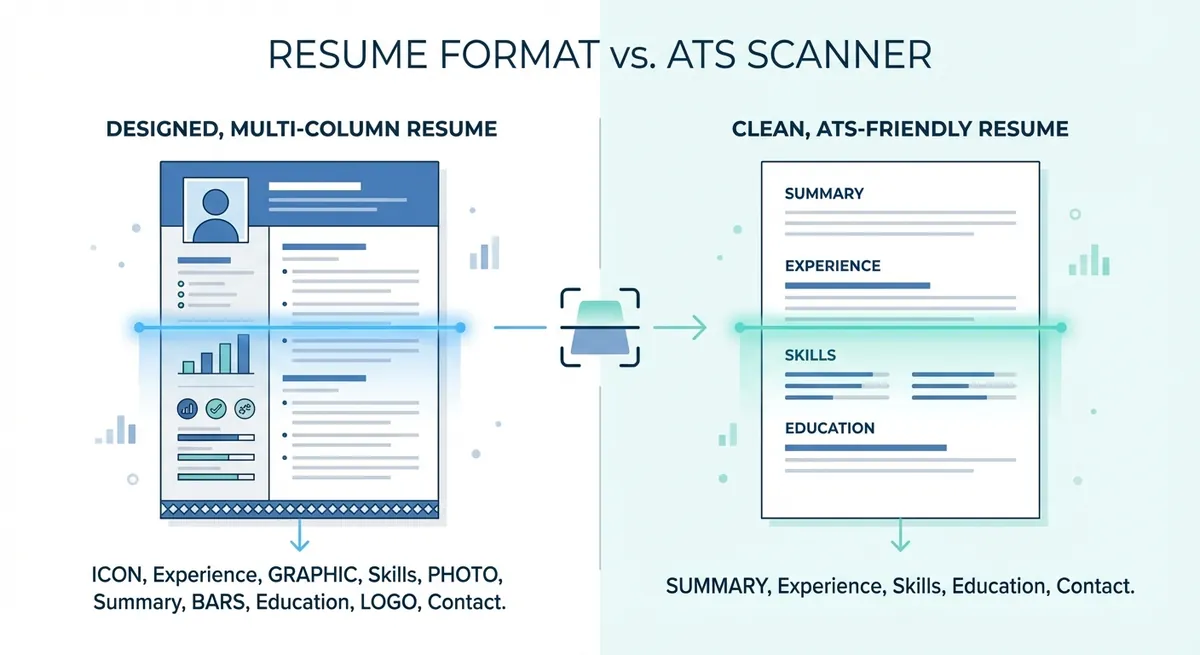
A side-by-side visual comparing a heavily designed two-column resume filled with graphics against a clean, single-column ATS-friendly resume, highlighting how the scanner reads the text of each.
Testing your document before applying
Never guess if your file will pass the test. Always check it.
If you want to beat the ATS consistently, you have to know exactly how your file looks to a computer. Run it through a Resume Checker to see if the text parses correctly.
Stop throwing a wrench in your own job hunt. Keep the design clean and let your experience do the talking.
Key Takeaways
- Keep your layout to a single column so the software can read left to right naturally. Engineers often get this from Jake's Resume, a free single-column LaTeX template.
- Use exact phrases from the job description to match the required skills.
- Stick to boring, standard headers like "Work Experience" and "Education".
- Avoid tables, charts, and graphics completely.
- Always save and upload your file in the format requested by the employer.
Trying to beat the ATS doesn't have to be a nightmare. It just requires a little strategy. You have to play by the rules of the software to get your application in front of a real person. If you are ready to stop stressing over formatting, check out OneTwo Resume to build a document that actually gets read.