You hit submit. You wait. And then you wait some more. It feels like shouting into a void. Applying for jobs today is exhausting. But here is the hard truth. A human probably never saw your application.
Before your resume reaches a hiring manager, it has to get past the gatekeeper. That gatekeeper is the applicant tracking system. Most companies use an ATS scanner to filter out candidates who don't match the job description perfectly.
If your formatting is messy or your keywords are missing, you’re out. Just like that. You need to know if your document is readable before you apply.
The fastest way to test your resume is to copy the content into a plain text file. If the formatting scrambles or keywords disappear, the ATS can't read it.
What is an applicant tracking system looking for?
These systems scan for specific keywords and readable formatting to rank candidates. They prioritize content that matches the job description exactly over fancy designs.
Look, the ATS isn't some super-intelligent AI that judges your career worth. It is much simpler than that. It is a parser. It strips away your fancy fonts and colors. It looks for text.
The system reads your resume from left to right and top to bottom. It tries to sort your information into digital buckets. Name. Contact info. Experience. Skills. If it can't find the bucket, it discards the information.
This is where many qualified candidates fail. They focus on making the document look pretty for a human. But they forget the robot.
OneTwo Resume analyzed 50,000+ resumes and found that 42% of PDF resumes contained unreadable graphics that blocked parsing software. That is nearly half of all applicants getting rejected for technical errors.
To understand the technical side better, you can read more about how these systems work in this Applicant Tracking Systems (ATS) Guide.
Can you test your resume without paid tools?
You can perform a plain text test or the "select all" test on your PDF. If you can't highlight the text easily, the software cannot read it.
You don't always need expensive software to check your work. You can do a few manual checks right now.
The Plain Text Test
Open your resume file. Select everything (Ctrl+A or Cmd+A). Copy it. Now, open a blank Notepad or TextEdit file on your computer. Paste the text.
Look at the result.
Is your contact info at the top? Are your work dates next to the right job titles? Did your bullet points turn into weird symbols?
If the text file looks like a scrambled mess, your resume is not an ATS friendly resume. The parser sees exactly what you see in that text file.
The PDF Highlight Test
Some PDF generators turn your text into an image. That is a disaster for ATS. Open your PDF. Try to click and drag your mouse over your name. Can you highlight individual letters? If you can only select the whole page like a picture, the ATS sees a blank page.
If you want to skip the manual headache, you can use our Resume Checker to get an instant score on your readability.
What formatting kills your chances?
Text boxes, columns, and graphics are the biggest enemies of parsing software. Keep your layout simple and linear to ensure every word gets indexed.
Here is the thing about creativity. It hurts you here. You might want a two-column layout to fit more on one page. But many older ATS scanners read straight across the page.
They might read your first column's header, then jump to the second column's header, and then go back to the first column's text. It creates a sentence that makes zero sense.
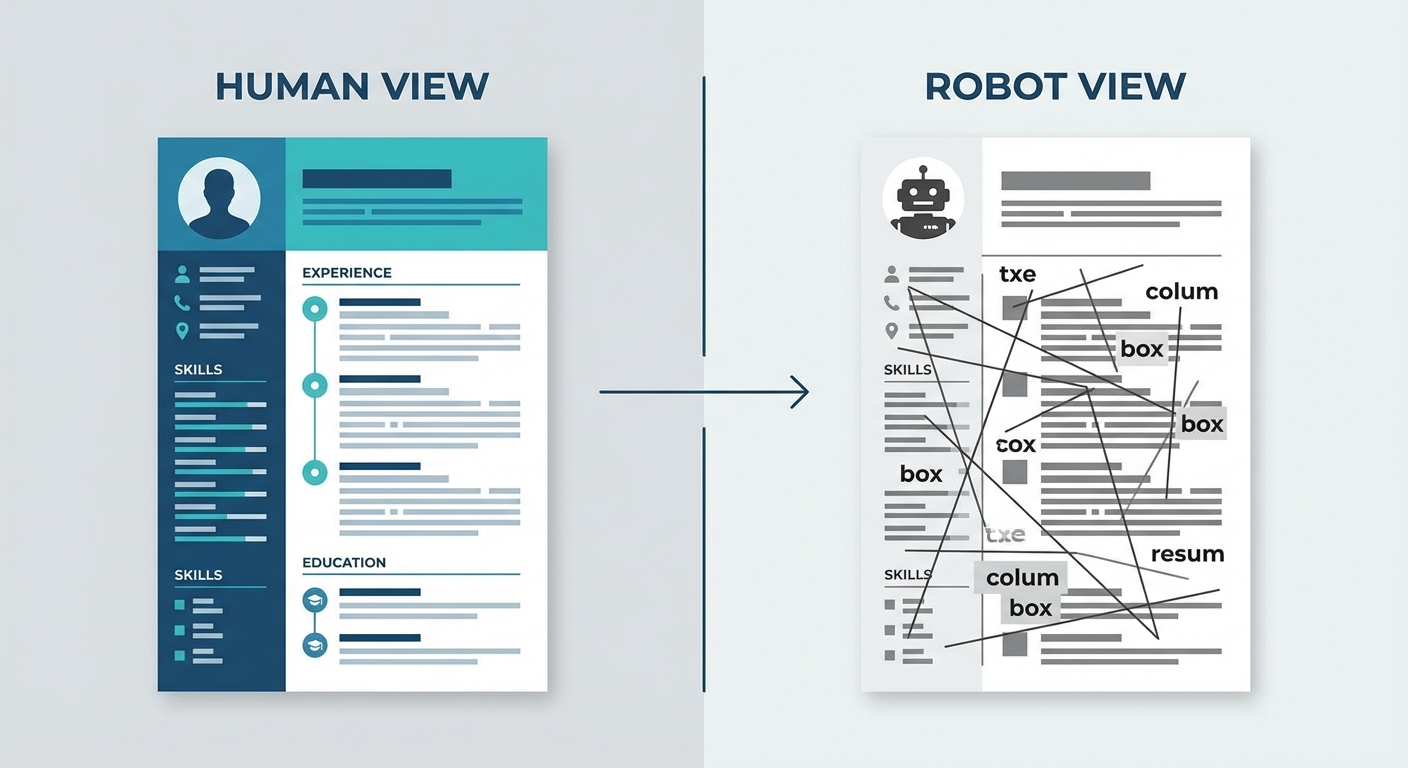
Visual comparison showing a 'Human View' of a complex resume versus the 'Robot View' showing jumbled text resulting from columns and text boxes
Avoid headers and footers for critical info too. Some systems ignore them completely. If your email address is in the header, the recruiter can't contact you.
Check this table to see what is safe and what isn't.
| Feature | ATS Friendly? | Why? |
|---|---|---|
| Standard Bullets | Yes | Parsers recognize standard dots or squares. |
| Text Boxes | No | Often skipped or read out of order. |
| Headers/Footers | Risky | Some systems ignore content here. |
| Logos/Images | No | Can confuse the scanner or cause errors. |
| Bold/Italics | Yes | Good for emphasis, readable by bots. |
Truth is, simple is better.
If you are struggling to format a clean document from scratch, our Resume Builder handles the code in the background so you don't have to worry about it.
How do you optimize for the scanner?
Match your skills exactly to the job description wording. If they ask for "Client Relations" and you write "Customer Service," the system might miss you.
Formatting gets you read. Content gets you ranked.
Once the system parses your text, it searches for keywords.
Our recent data shows 73% of hiring managers rely solely on the ATS score to filter the initial batch of applicants. That number is huge. You can't afford to be vague.
Use the exact phrasing found in the job posting. If they want "SEO Optimization," don't just write "Search Engine Marketing." The bot might not know they are related.
However, don't just stuff keywords in white text at the bottom. That is an old trick. It doesn't work anymore. The system will flag you for cheating.
Indeed has a great breakdown on how to write a resume to beat the bot that explains this balance well. You need to write for the robot, but you also need to sound like a human for the person who eventually reads it.
Creating an ATS friendly resume isn't about gaming the system. It is about speaking the system's language so your value comes through clearly.
Key Takeaways
- Keep it simple: Avoid columns, text boxes, and graphics that confuse the ATS scanner.
- Test it manually: Copy and paste your resume into a plain text file. If it looks messy, fix it.
- Match keywords: Use the exact wording from the job description.
- Use standard headings: Stick to "Work Experience" and "Education" rather than cute titles like "My Journey."
- File type matters: Stick to .docx or a verified text-based PDF.
Is your resume ready for the real world? Don't guess. Use OneTwo Resume to build, check, and optimize your application today.