You’ve done the work. You have the experience. But staring at that blank skills section is intimidating. It feels like you have to list everything you’ve ever done since high school or you’ll miss out on the job. That’s not true. In fact, overstuffing this section is one of the fastest ways to get rejected.
Here’s the thing. In Ladders' eye-tracking study, recruiters' initial screen of a resume averaged 7.4 seconds. They don't have time to guess what you're good at. They need to see it immediately. Listing skills effectively isn't just about keywords. It is about strategy.
Tailor your skills section to the specific job description by mixing hard and soft skills in a distinct, scannable list without fluff.
What skills should you put on a resume?
Put 8–12 skills that appear in the job description: mostly hard skills (tools, certifications, methods), the soft skills you can prove in your bullet points, and nothing you couldn't discuss for two minutes in an interview.
Three filters decide whether a skill earns a line:
- It's in the posting. Applicant tracking systems and recruiters both search for the exact terms in the job description. If the ad says "Salesforce," write "Salesforce," not "CRM software."
- It's specific. "Excel (pivot tables, VLOOKUP, macros)" beats "Microsoft Office." "Spanish (fluent)" beats "bilingual."
- You can back it up. Every skill you list is fair game in the interview. If you took one Python tutorial, leave Python off.
Skills to put on a resume: 100+ examples by job type
Start with your field, pull the skills that match the posting, then add a few from the soft-skills list that your experience bullets can prove.
Technology and data
Python, SQL, JavaScript, TypeScript, Java, React, Node.js, REST APIs, Git/GitHub, AWS, Azure, Docker, Linux, Excel (advanced), Tableau, Power BI, data analysis, A/B testing, machine learning basics, Jira, Agile/Scrum, QA testing, cybersecurity fundamentals.
Healthcare
Patient care, vital signs, EHR/EMR systems (Epic, Cerner), HIPAA compliance, medication administration, phlebotomy, CPR/BLS certification, ICD-10 coding, infection control, patient scheduling, medical terminology, care planning, wound care, telehealth platforms.
Office, administrative and customer service
Microsoft 365 (Word, Excel, Outlook), Google Workspace, calendar management, data entry (with your typing speed), CRM software (Salesforce, HubSpot, Zendesk), multi-line phone systems, bookkeeping, QuickBooks, travel coordination, records management, bilingual Spanish/English, conflict de-escalation, order processing.
Sales and marketing
Lead generation, cold outreach, CRM (Salesforce, HubSpot), pipeline management, negotiation, account management, SEO, Google Ads, Meta Ads, email marketing (Mailchimp, Klaviyo), Google Analytics, content writing, social media management, copywriting, market research, presentation skills.
Finance and accounting
GAAP, financial modeling, budgeting and forecasting, accounts payable/receivable, reconciliations, QuickBooks, SAP, NetSuite, Excel (advanced), audit preparation, tax preparation, variance analysis, payroll, financial reporting.
Skilled trades, logistics and operations
Forklift certification, OSHA 10/30, CDL Class A, blueprint reading, MIG/TIG welding, HVAC, electrical systems, preventive maintenance, inventory management, warehouse management systems, route planning, safety compliance, equipment operation, quality control.
Education, nonprofit and public sector
Lesson planning, classroom management, IEP development, curriculum design, student assessment, grant writing, volunteer coordination, fundraising, program management, community outreach, public speaking, case management.
Soft skills employers actually check (and how to prove each one)
Soft skills belong in your experience bullets more than in the skills list — but these are the ones hiring managers look for, with the kind of line that proves them:
- Communication — "Presented weekly status reports to 30+ stakeholders across three departments."
- Problem-solving — "Diagnosed a recurring billing error and built the checklist that eliminated it."
- Teamwork — "Coordinated with design and engineering to ship four releases on schedule."
- Adaptability — "Took over a second territory mid-year and kept both above quota."
- Time management — "Handled 60+ tickets a day while maintaining a 96% first-response SLA."
- Leadership — "Trained and mentored five new hires; three were promoted within 18 months."
- Attention to detail — "Audited 1,200 records with zero errors found in external review."
- Customer focus — "Raised customer satisfaction from 4.2 to 4.7 in six months."
- Critical thinking — "Rebuilt the reporting model after spotting a flawed assumption in the forecast."
- Conflict resolution — "De-escalated escalated calls with a 90% retention rate."
Hybrid skills (both technical and interpersonal)
Project management, technical writing, customer success, data-driven decision-making, UX research, training and onboarding, vendor management, process improvement, stakeholder management.
10 in-demand resume skills for 2026
There is no official ranking of resume skills, but these cut across almost every field, and several match what employers told the World Economic Forum's Future of Jobs Report 2025: analytical thinking is the most sought-after core skill, and AI and big data, networks and cybersecurity, and technology literacy are the fastest-growing. If you have them, make them visible:
1. AI tools at work — using ChatGPT, Copilot or similar for drafting, analysis and research (name the tools).
2. Data literacy — reading dashboards, building spreadsheets, basic SQL.
3. Digital collaboration — Slack, Microsoft Teams, Asana, Notion, Zoom.
4. Cybersecurity awareness — data handling, phishing awareness, compliance basics.
5. Cloud basics — Google Workspace/Microsoft 365 at minimum; AWS/Azure for technical roles.
6. Analytical thinking — turning numbers into a decision.
7. Adaptability — evidence you learned a new system or role quickly.
8. Written communication — clear email, documentation, summaries.
9. Project management — owning a timeline and a budget, even informally.
10.Bilingual ability — especially Spanish/English in healthcare, customer service, sales and education.
Resume skills section examples
Software developer
Languages: Python, TypeScript, SQL · Frameworks: React, Node.js, Django · Cloud & tools: AWS (EC2, S3, Lambda), Docker, Git, Jira · Practices: Agile/Scrum, CI/CD, unit testing
Medical assistant
Clinical: Vital signs, phlebotomy, injections, EKG · Systems: Epic EHR, Cerner · Certifications: CMA (AAMA), CPR/BLS · Languages: English, Spanish (fluent)
Administrative assistant
Software: Microsoft 365, Google Workspace, QuickBooks, Salesforce · Operations: Calendar management, travel coordination, expense reports, records management · Typing: 75 WPM
Notice the pattern: categories, specific tools, no ratings bars, no "team player." Each block fits in three lines and gives the ATS exact keywords to match. For a skills list tailored to your exact job, open the matching page in our resume examples by job — every example lists the key skills for that role.
Where should I actually put my skills section?
Position your skills section based on your experience level; place it near the top for technical roles or career changes, and closer to the bottom for executive positions.
The Hybrid Approach
Most people think there is only one place for skills. Usually at the bottom. But the modern resume format has shifted. If you are applying for a technical role, your skills are your biggest selling point. Put them high up. Right under your professional summary.
For general roles or management positions, you have more flexibility. You can place a "Core Competencies" section near the top and a detailed technical list at the bottom. This works. It catches the eye immediately but leaves room for your work history.
The Sidebar Strategy
Using a sidebar is popular right now. It looks clean. It saves space. But be careful. Some older Applicant Tracking Systems (ATS) struggle with sidebars. If you are applying to a massive corporation with an old portal, stick to a single-column layout. If you are emailing a PDF to a human, go for the sidebar.
And if you aren't sure which layout suits you, check our Resume Builder to test different templates instantly.
What is the right mix of hard and soft skills?
Focus heavily on hard skills that match the job requirements while weaving your soft skills into your experience bullet points for context.
Don't Just List Buzzwords
We all know the standard fluff. "Hard worker." "Team player." These words mean nothing on their own. Anyone can type them. You need to prove them. Instead of cluttering your skills list with vague personality traits, put hard skills in the list and soft skills in your bullet points.
For example, don't list "Communication" as a skill. Instead, in your job description, write: "Presented quarterly reports to 50+ stakeholders." That proves communication. See the difference?
Here is a breakdown of how to separate them:
| Skill Type | Definition | Best Place to Put It | Examples |
|---|---|---|---|
| Hard Skills | Teachable, measurable abilities | Dedicated Skills Section | Python, SEO, Spanish, Phlebotomy, Accounting |
| Soft Skills | Interpersonal attributes | Work Experience / Summary | Leadership, Adaptability, Conflict Resolution, Time Management |
| Hybrid Skills | A mix of both | Summary or Skills Section | Project Management, Customer Service, Technical Writing |
The Keyword Game
ATS bots scan for nouns. They look for specific software names, certifications, and methodologies. A modern resume format relies on these specific keywords to get you past the initial filter. Look at the job description. If they ask for "Adobe Creative Suite," don't just write "Graphic Design." Write "Adobe Creative Suite."
Truth is, being specific wins interviews.
For a deep dive into exactly which terms are trending in your specific field, the Bureau of Labor Statistics: Occupational Outlook Handbook is a fantastic resource to research standard industry requirements.
How do I format skills to beat the bots?
Use clear headings and standard bullet points to categorize your skills so both humans and automated systems can parse the data correctly.
The Power of Categorization
Don't make a giant blob of text. It's unreadable. Break your skills into categories. If you are a marketer, you might have "Content Strategy," "Analytics," and "Social Media Tools." This makes you look organized. It helps the recruiter find what they need in split seconds.
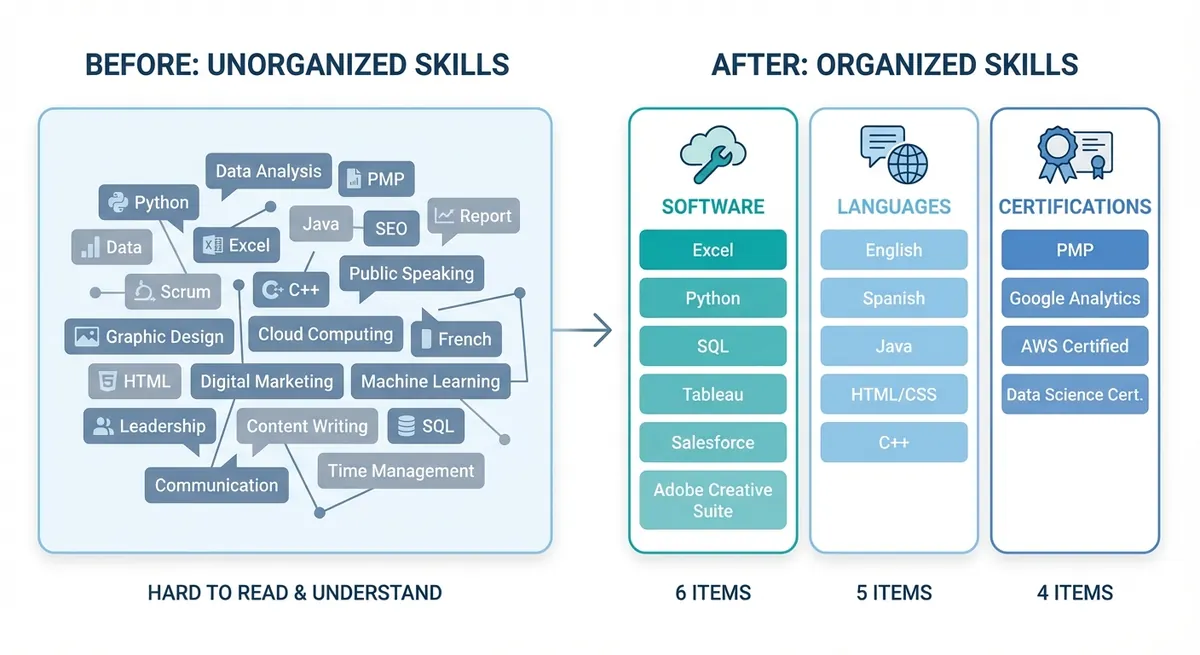
Visual comparison showing a messy block of 20 skills vs. the same skills neatly organized into 3 clear categories like 'Software', 'Languages', and 'Certifications'
Avoid the Proficiency Bar Trap
You have seen them. Those little progress bars or star ratings next to skills. 4 out of 5 stars in Photoshop. 80% in Excel. Avoid these. They are arbitrary. What does 80% in Excel mean? Do you know macros? Or just pivot tables? It confuses recruiters. And it can confuse the ATS software too.
Just list the skill. If you are an expert, add "(Expert)" or "(Advanced)" in text next to it. Keep it simple.
Need to know if your formatting is bot-friendly? Run your document through our Resume Checker to see how an ATS reads your file.
Keep It Relevant
You might be proud of your CPR certification. But if you are applying for an accounting job, it probably doesn't belong there. Every line on your resume is valuable real estate. Don't waste it. If a skill doesn't help you do the job you are applying for, cut it.
There are plenty of professional resume guides out there, but the best advice is always to edit ruthlessly. If you need inspiration on what to include, the Indeed Career Guide: Best Skills to Put on a Resume offers great lists by industry.
Key Takeaways
- Location matters. Put technical skills at the top for tech roles, but balance them lower down for general roles.
- Categorize everything. Group skills into logical buckets (Software, Languages, etc.) to help the reader.
- Hard skills go in the list. Soft skills go in the experience section. Don't mix them up too much.
- Ditch the graphics. Progress bars and rating scales usually hurt more than they help. Text is safer.
- Tailor it every time. A modern resume format is flexible. Change your skills list for every single application.
Writing a resume is tough. But listing your skills shouldn't be a guessing game. Use these resume tips to clean up your document and get seen. Ready to build a resume that actually gets interviews? Turn your duties into achievements with the free resume bullet point generator, then check out OneTwo Resume to put it all together.