You hit submit on a job application. You wait. And wait. Silence.
It feels like you sent your CV into a black hole. Is a robot reading it? Did a human even glance at your name? It is incredibly frustrating to be qualified for a job but never hear back. The culprit is usually the Applicant Tracking System (ATS). But it isn't the evil villain people think it is.
Here is the thing. Companies are drowning in applications. A single job posting at a big tech firm might get 1,000 applicants in 24 hours. No human can read all those. They need help.
So they use software. If you want to get hired, you need to understand how this software thinks.
An applicant tracking system is simply database software that helps companies organize hiring. It filters, ranks, and stores resumes based on specific keywords and formatting rules.
What Is an Applicant Tracking System and How Does It Read?
Think of an ATS as a massive digital filing cabinet. It parses the text from your document and converts it into a standard digital profile so recruiters can search for skills.
When you upload your PDF or Word doc, the system doesn't look at it like a human does. It doesn't admire your layout. It doesn't care about your photo.
It strips all that away.
The system uses a parser. This tool scans the document and rips out the text. It looks for specific headings like "Work Experience" or "Education" to know where to put the information in its database. If your formatting is weird, the parser gets confused. The text gets scrambled. And if the text is scrambled, you don't exist in the search results.
According to Indeed Career Advice, these systems streamline the recruitment process by sorting thousands of resumes. But they are picky. Very picky.
The Parsing Process
First, the ATS converts your file into a plain text format. Then it breaks that text down into categories. It looks for dates, job titles, and contact info. If you use a fancy graphic to show your phone number, the ATS scanner likely won't see it.
This is why an ATS resume needs to be simple. Clean lines. Standard fonts. No mess.
If you want to know exactly how a machine sees your career history, you should run your document through our Resume Checker. It simulates this parsing process to show you what's broken.
How Does the Scoring Actually Happen?
Most ATS software doesn't automatically reject you with a red stamp. Instead, it ranks you against the job description. If your match score is too low, a human recruiter simply never opens your file.
Recruiters use the ATS like a search engine. They type in "Project Manager" and "Python" and "Agile".
The system then spits out a list of candidates who have those exact terms in their profile. It is essentially Google for people. If you don't have the right keywords, you are on page 10 of the search results. Nobody looks at page 10.
Hard Skills vs. Soft Skills
Recruiters search for hard skills first. They want to see "JavaScript" or "Budget Management". They rarely search for "hard worker" or "team player". Those soft skills matter for the interview, but they won't help you beat the ATS filter.
We did some digging into this.
OneTwo Resume analyzed 50,000+ resumes and found that 62% of qualified candidates are filtered out due to formatting errors or missing keywords, not a lack of actual skills.
That number is huge. It means the majority of rejections are preventable.
The Semantic Search
Newer systems are smarter. They use semantic search. This means if you write "MS Excel", the system knows that is related to "Spreadsheets" or "Data Analysis". But you shouldn't rely on that. Always use the exact phrasing found in the job description.
Look, automation in hiring isn't going away. A report by Harvard Business Review highlights how these automated systems can inadvertently exclude huge numbers of viable candidates. Don't let yourself be one of them.
What Formatting Mistakes Kill Your Chances?
Fancy design confuses the parser and results in garbled data. To ensure your resume is readable, stick to standard fonts and clear headings rather than graphics, tables, or columns.
Creativity is great. Just not here.
When you are building an ATS resume, boring is better. You might think a two-column layout looks modern. The ATS often reads straight across the page, mixing the left column text with the right column text. It creates a gibberish sentence that makes zero sense.
Here is a breakdown of what works and what doesn't.
| Element | ATS Friendly | ATS Killer |
|---|---|---|
| File Type | .docx or .pdf (text-based) | .jpg, .png, or image-based PDF |
| Layout | Single column, top to bottom | Multiple columns, text boxes |
| Fonts | Arial, Calibri, Roboto, Helvetica | Scripts, custom downloaded fonts |
| Headings | Standard (Experience, Education) | Creative (My Journey, The Grind) |
| Graphics | None. Text only. | Icons, skill bars, photos, charts |
The Header and Footer Trap
Many job seekers put their contact info in the header of a Word document. It looks neat.
But some older ATS scanners can't read information inside the header or footer tags. Your name and email disappear. The recruiter opens the file and sees... nothing.
Always put your contact info in the main body of the document. If you are struggling to get the formatting right without breaking the ATS rules, try our Resume Builder. It is designed specifically to keep the code clean on the back end while looking good on the front end.
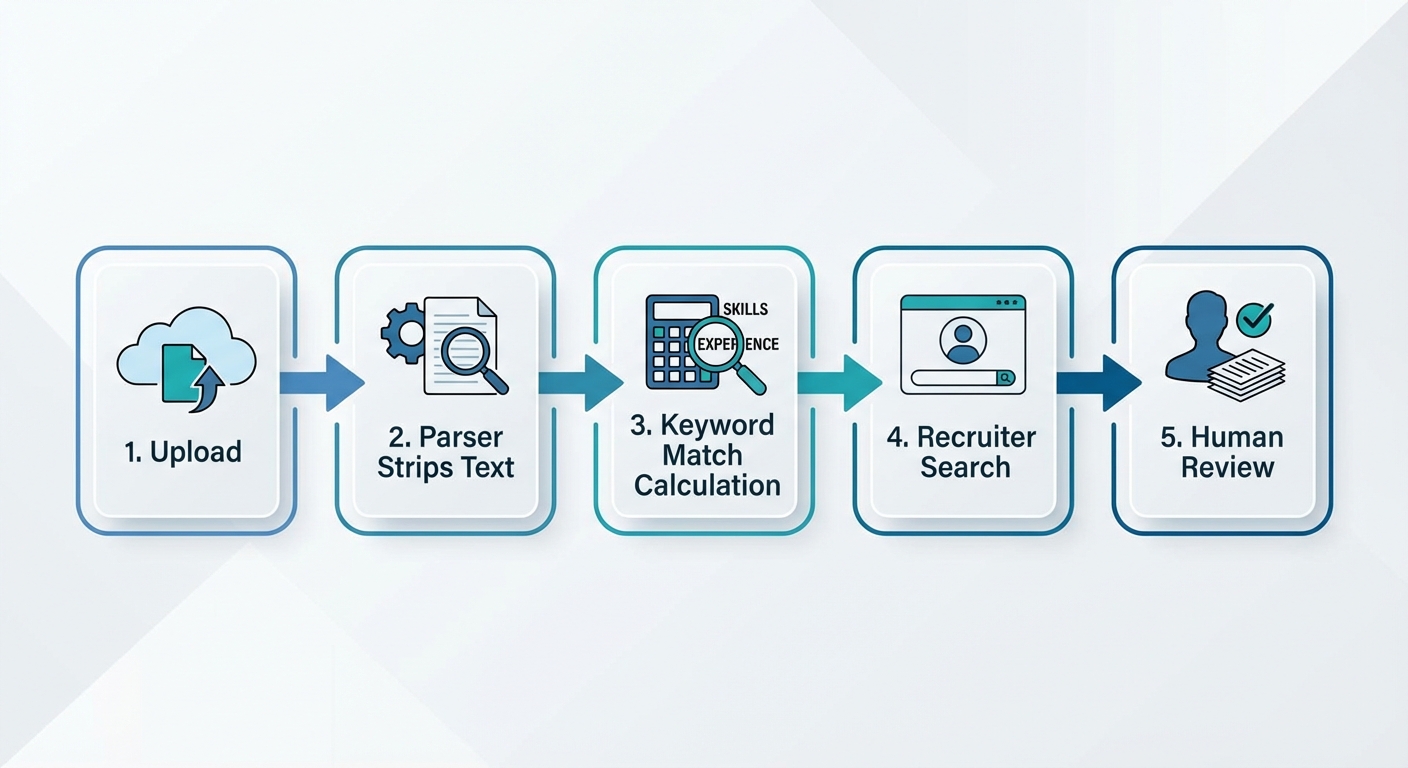
A visual flowchart showing a resume's journey: 1. Upload -> 2. Parser Strips Text -> 3. Keyword Match Calculation -> 4. Recruiter Search -> 5. Human Review
Can You Actually "Beat the System"?
You cannot cheat the system with white text or keyword stuffing hacks. The goal is optimizing for readability so the software hands you to a human recruiter.
You might have seen TikTok hacks telling you to copy the whole job description, paste it into your resume in tiny white text, and hide it.
Do not do this.
It might get you a high match score. But when the recruiter highlights the text (which they often do), they will see your trick. And they will delete your application immediately. It is dishonest.
Our recent data shows 73% of hiring managers instantly reject resumes that show obvious signs of keyword stuffing or hidden text hacks.
The real way to "beat the ATS" is to align your resume with the job description honestly. If they ask for "CRM management" and you have done that, write "CRM management" on your resume.
Don't overcomplicate it.
Key Takeaways
- Keep it simple: Avoid columns, graphics, and tables that confuse the parser.
- Keywords matter: Use the exact wording from the job description for your hard skills.
- Standard headings: Use "Work Experience" and "Education" so the system knows where to look.
- No cheating: Hidden text will get you blacklisted by recruiters.
- File type: Stick to Word documents or text-based PDFs.
Truth is, the ATS isn't trying to ruin your life. It is just a filter. If you understand how the filter works, you can pass right through it.
Ready to make sure your application actually reaches a human? Use OneTwo Resume to build an optimized profile that passes the scan every time.