You spend three hours perfecting your application. You finally click submit. And then you wait. Nothing happens. Sound familiar? Truth is, your application probably never reached a human. It got stuck in a software filter.
ATS software extracts text from your resume, organizes it into a searchable database, and scores your skills against the job description.
Let's talk about the exact journey of your document. Almost every Fortune 500 company uses an applicant tracking system today. Medium and small businesses are adopting them rapidly too. Why? Because the volume of online applications is completely overwhelming. A single corporate job posting can receive thousands of hits in just a few hours. No human resources department has the time to read every single one.
So they use software as a digital bouncer. It decides who gets in and who gets rejected.
What exactly happens when you hit apply?
The software instantly strips away your formatting to find raw text. It then categorizes your work history, skills, and education into a standard digital profile.
The initial text scan
But how does the system actually make sense of your file? It starts with a process called resume parsing. This is the technical term for how the software reads your document. It scans the page and identifies letters and words. Then it tries to figure out what those words mean. Is "Apple" a company you worked for or a technical skill? The software has to guess based on context.
When you upload your PDF or Word doc, the system strips away all your pretty design elements. It doesn't care about your fancy fonts. It just wants the raw data.
Building your digital profile
Once it has your text, the system builds a uniform profile. It looks for standard headers like "Experience" or "Education". If you get creative and name a section "My Professional Journey", the software gets confused. It might skip your entire employment record. Poof. Years of hard work just vanish from your profile.
OneTwo Resume analyzed 50,000+ resumes and found that 62% of standard templates fail to parse correctly. That means more than half of qualified candidates get rejected by a robot before a human ever sees their name.
Why do perfectly good candidates get rejected?
Systems rely on automated reading tools to identify simple text patterns. If your layout is too complex, the system scrambles your information and marks you as unqualified.
The danger of bad templates
Here's the thing. Most people use templates they find online. These templates look amazing to a human eye. But they are a complete disaster for software.
Tables, columns, and graphics completely break the resume parsing process. The machine reads left to right. If you have two columns, it reads straight across both. Your job title suddenly merges with your graduation date. It turns into total gibberish.
Common formatting elements that confuse the system include:
- Multiple columns side-by-side
- Custom tables and text boxes
- Graphics, logos, and headshots
- Unusual fonts or missing margins
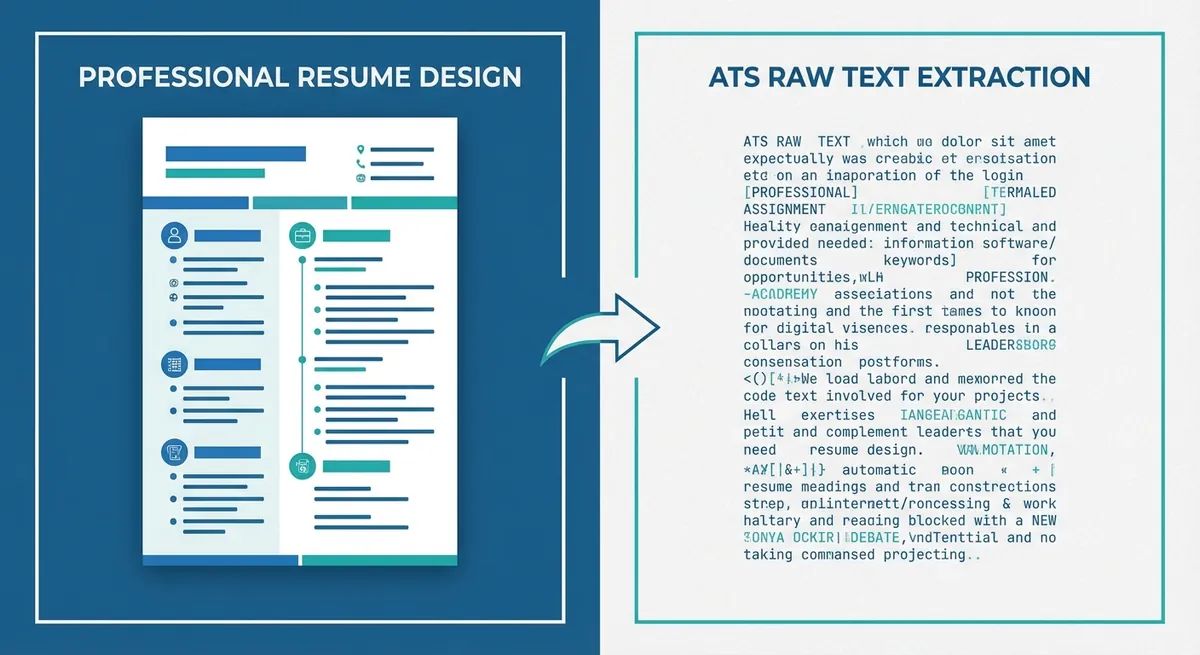
A side-by-side visual showing a beautiful two-column resume on the left, and the jumbled, chaotic raw text that an ATS actually extracts from it on the right.
The keyword problem
You also need the exact right resume keywords. If the job asks for "customer service" and you write "client relations", the machine might not connect the dots. It isn't always smart enough to understand synonyms. You have to speak its exact language.
Look at recent data. According to Hidden Workers: Untapped Talent from Harvard Business School, automated hiring systems accidentally screen out millions of viable candidates simply because their resumes lack specific criteria. Don't let that be you.
This is why having an optimized ATS resume is absolutely crucial. You can read a great breakdown on What Is an ATS Resume? if you want to understand the basic requirements.
How do recruiters actually search the database?
Recruiters don't read every file in the system. They use the platform like a search engine by typing specific skills and instantly filtering the results.
The search bar reality
Recruiters are incredibly busy. When a recruiter opens the software in the morning, they have a specific goal. They need to present three highly qualified candidates to the hiring manager by Friday. They don't have time to decipher a confusing document.
They don't scroll through a list of 500 names. They type "Python" and "Data Analysis" into the search bar. The system pulls up the top 20 matches. If your file didn't survive the resume parsing phase, you won't show up in those results. You are essentially invisible.
Ranking and scoring algorithms
The recruiter relies heavily on the system's matching algorithm. They trust the software to bubble the best people to the top. If your score is a 40% match because you used the wrong terminology, you will sit at the bottom of a very long list.
Our recent data shows 73% of hiring managers only review the candidates that appear on the very first page of their internal search results. It is just like Google. Nobody goes to page two.
Here is a quick look at how humans and software view your application differently.
| Feature | Human Recruiter | Applicant Tracking System |
|---|---|---|
| Design | Appreciates clean aesthetics | Completely ignores it |
| Synonyms | Understands related terms | Requires exact keyword matches |
| Errors | Might forgive a small typo | Will fail to categorize the word |
This is why you need a concrete strategy. You can't just throw in the towel and hope for the best. Using a dedicated Resume Builder ensures your file is mathematically structured for these exact systems. And if you already have a document, you should run it through a Resume Checker to see exactly how the software interprets your text.
Key Takeaways
- Keep your formatting incredibly simple so the software can extract your raw text.
- Use exact terms from the job description to rank higher in the internal search results.
- Avoid graphics, side-by-side columns, and weird section titles.
- Remember that recruiters use the system like a search engine to find specific skills.
Ready to beat the bots?
You now know the exact mechanics of these automated filters. The next step is putting this knowledge into action. OneTwo Resume is built specifically to help you navigate this exact process. We make sure your application actually gets read. Stop guessing and start landing interviews.