You hit "Submit Application" and wait. Days pass. Then weeks. Nothing happens. It feels like shouting into a void.
We have all been there.
The silence isn't usually because you aren't qualified. It is often because your resume never surfaced. The Applicant Tracking System, or ATS, stores, filters and ranks applications, and a recruiter working through hundreds of them reads from the top of that ranking. You will often see it claimed that these systems reject 75% of resumes instantly; that figure has no primary source — we traced it in our ATS statistics source check. What is documented is that employers filter and rank on the job description's criteria.
But you can beat them. You just need to know how they think.
ATS-proofing requires a clean layout without columns or graphics and the inclusion of exact keywords from the job description so software can read your file.
What Actually Changed with ATS in 2025?
Answer Capsule: The tech now understands context and synonyms better than before. However, it still struggles with complex formatting like tables or creative graphics.
AI is Smart, But Not That Smart
Machine learning has advanced. The systems used in 2025 can read "semantic" language. That means if you write "coding," the bot knows it is related to "software development." That is good news.
But here is the catch.
These systems are still easily confused by bad formatting. They try to parse your document into a digital profile. If you use a text box to display your contact info, the bot might read your email address as part of your work history. Or it might not see it at all.
We looked at the numbers.
Complexity is the enemy.
The "Hidden" Text Trick is Dead
Years ago, people tried a sneaky trick. They would copy the entire job description, paste it into their resume in white font, and hide it.
Do not do this.
Modern ATS algorithms flag this instantly as "keyword stuffing." It will get you banned. The system sees everything. It renders all text in the same color on the recruiter’s end. You will look dishonest.
Context Is King
It used to be about just having the word "Java" on the page. Now, the system looks at where that word sits. Is "Java" listed under a job you held in 2018? Or is it in a "Skills" section?
The system weighs recent experience more heavily. If you haven't used a skill in ten years, the bot knows.
How Do You Find the Right Keywords?
Answer Capsule: Analyze the specific job description to find repeated hard skills and match them exactly. Use standard industry terms rather than creative job titles.
The Mirror Method
Your resume needs to act like a mirror. It should reflect the language of the job posting back to the employer.
Read the job description. Highlight the hard skills. These are things like "Project Management," "Python," or "Financial Analysis." If they say "Client Relations" and you have "Customer Service" on your resume, change it. Use their words.
You don't need to guess.
There are great resources for this. You can check the Bureau of Labor Statistics: Occupational Outlook Handbook to see standard keywords and skills for your specific industry. This helps you align with the broader market, not just one job post.
Don't Forget Soft Skills
Hard skills get you found. Soft skills get you hired.
Bots search for terms like "leadership," "communication," and "collaboration." But you can't just list them. You must prove them.
Our 2025 data shows 73% of hiring managers prioritize candidates who match at least 80% of the technical skills listed in the job posting, but they interview the ones with strong soft skills.
Use our Resume Checker to scan your draft against a job description. It will tell you exactly which keywords you are missing.
Frequency and Placement
Mention your top skills more than once. Put them in your summary. Put them in your skills section. Weave them into your bullet points.
But don't go crazy.
Writing "Sales" twenty times looks weird to the human who eventually reads it. Twice or three times is plenty.
What Formatting Mistakes Kill Your Chances?
Answer Capsule: Fancy designs confuse the bots and scramble your work history. Stick to clean fonts, standard margins, and a simple hierarchy to stay safe.
The Table Trap
Tables look neat to human eyes. They are a nightmare for robots.
When an ATS scans a table, it often reads the text left-to-right, ignoring the rows. This mashes up your dates, titles, and descriptions into a garbled mess.
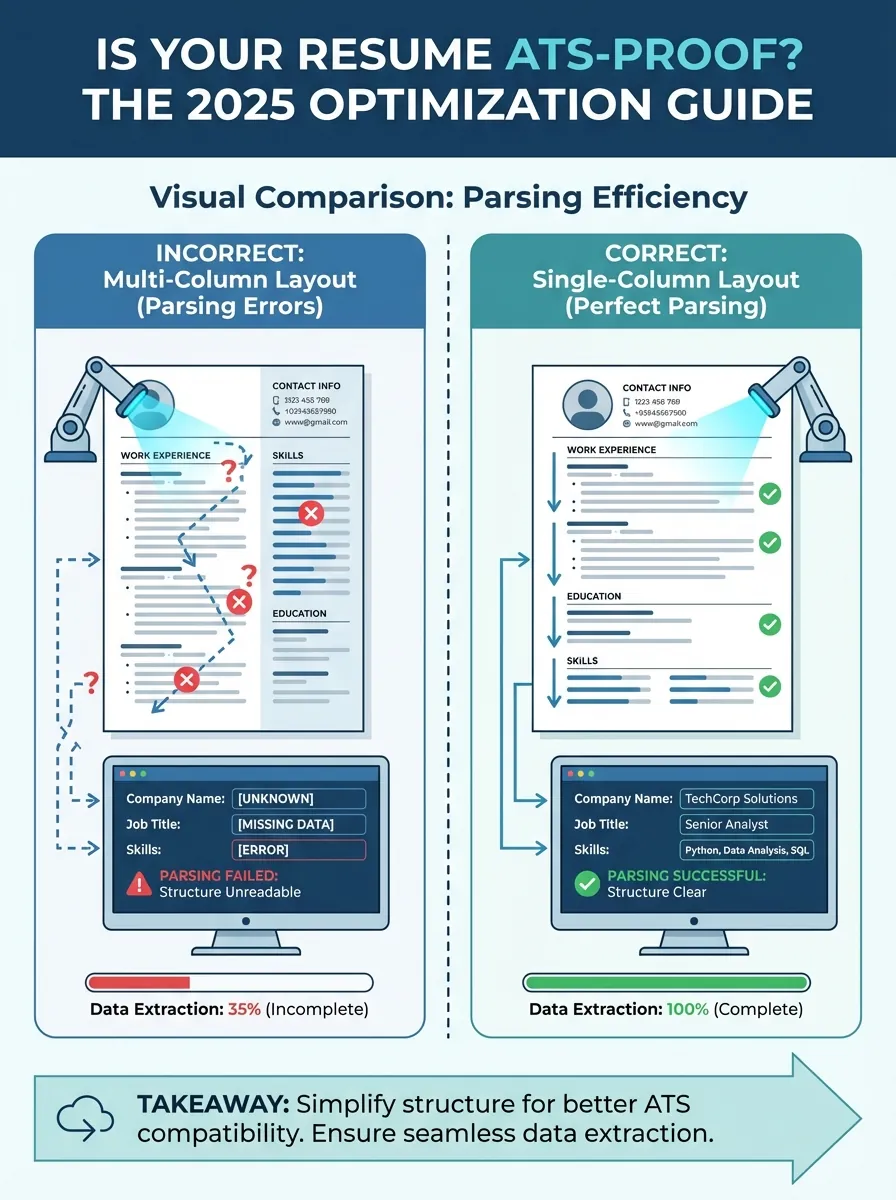
Visual comparison showing a resume with columns being parsed incorrectly vs. a single-column resume being parsed perfectly
If you want a layout that looks good but scans perfectly, try our Resume Builder. We built the templates specifically to pass these checks.
Fonts and File Types
Stick to the classics. Arial, Calibri, Helvetica, or Roboto.
You might love a unique serif font. The ATS might not. If the system doesn't recognize the font, it defaults to squares or question marks.
And always check the file type request. PDF is usually the standard. It locks your formatting in place. However, some older systems still demand a Word doc (.docx). If they ask for Word, give them Word.
Comparison: What Works vs. What Fails
Here is a breakdown of what passes the scan and what gets trashed.
| Feature | ATS-Friendly (Do This) | ATS-Killer (Avoid This) |
|---|---|---|
| Layout | Single column, top-to-bottom | Two columns, sidebars |
| Headings | Standard (Experience, Education) | Creative (My Journey, Knowledge) |
| Graphics | None. Text only. | Logos, icons, headshots, charts |
| Dates | MM/YYYY or Month Year | "2 years" or vague timelines |
| Lists | Standard round bullets | Arrows, checkmarks, emojis |
Does the Human Element Still Matter?
Answer Capsule: Yes, because the bot only opens the door while a real person makes the interview decision. Your resume must be readable for software but compelling for people.
The 6-Second Scan
The bot says you are a match. Now your resume lands on a recruiter's screen.
They spend about six seconds looking at it.
That is it. Six seconds.
If your resume is a wall of text crammed with keywords but has no flow, you lose. You need white space. You need clear headings. It has to be easy on the eyes.
Quantifiable Impact
Robots look for nouns. Humans look for numbers.
Don't just say you "managed a team." Say you "managed a team of 12 and increased sales by 20%."
This is where the real work happens. According to Harvard Business Review, focusing on results and value creation is the single best way to differentiate yourself from other qualified candidates. The bot gets you in the pile. The numbers get you the interview.
You can keep track of which version of your resume is performing best by using your Dashboard. If one version gets more interviews, stick with that one.
Key Takeaways
- Keep it simple. No columns, tables, or graphics.
- Mirror the job description. Use the exact keywords found in the posting.
- Standardize headings. Use "Work Experience" instead of "Professional History."
- Save as PDF. Unless the application specifically asks for a Word doc.
- Write for humans too. Use metrics and clear language once you pass the bot.
Ready to Beat the Bots?
It is frustrating to fight against an algorithm. But now you have the blueprint.
Don't let a bad layout ruin your chances in 2025. Head over to OneTwo Resume to build a profile that pleases the machines and impresses the humans. Let's get you hired.