You finally got the email. They want to talk. But instead of an address for a corporate office, you get a Zoom link. The interview game has changed. And while the questions might be similar to face-to-face meetings, the rules of engagement are totally different.
Here’s the thing. You can be the most qualified candidate in the pile. But if your audio cuts out or your lighting makes you look like a witness protection program volunteer, you won't get the offer. It sounds harsh. It is harsh. But it is also the reality of the modern job market.
Success here requires a mix of preparation and stage management. You need to be your own IT department. You need to be your own lighting director. And you need to be charming through a pinhole camera lens.
Success in virtual interviews relies on three specific factors: flawless technical setup, intentional eye contact with the camera, and clear audio quality.
How should you set up your space for a virtual interview?
Control your environment completely. Choose a quiet room with soft lighting in front of your face and test your internet connection ten minutes before the call.
Lighting is Everything
Don't sit with your back to a window. You will look like a silhouette. It makes it impossible for the hiring manager to connect with you. Instead, face the window. Natural light is the best filter you can buy. If it's dark out, put a lamp behind your laptop. You want soft light hitting your face evenly.
The Audio Check
Bad video is forgivable. Bad audio is not. If they can't hear you clearly, they can't hire you. Laptop microphones are usually terrible. They pick up typing, traffic outside, and the fan spinning inside your computer. Use headphones with a built-in mic. It doesn't have to be expensive gear. Even the wired earbuds that came with your old phone work better than the laptop mic.
And please, close the door. Lock it if you have to. It breaks the flow. It breaks the focus.
Does body language really matter on a screen?
Body language matters even more on video because your frame is smaller. Look directly at the camera lens to simulate eye contact and sit up straight to project energy.
The Eye Contact Trap
This is the hardest part. When we talk to people, we look at their faces. But in a remote interview, if you look at their face on the screen, you appear to be looking down. You are looking at their chin or their neck.
To make eye contact, you must look at the camera lens. It feels weird. It feels unnatural. But to the interviewer, it looks like you are looking right at them. Put a sticky note with an arrow next to the lens if you need a reminder.
Posture and Presence
Don't slouch. Just because you are sitting at your kitchen table doesn't mean you can relax your posture. Sit on the edge of your seat. It naturally straightens your spine and keeps your energy up. This helps you project confidence.
Also, consider your background. It doesn't need to be a blank white wall. A bookshelf or a tidy living room is fine. It shows personality. But avoid messy beds or piles of laundry. You want them focusing on your skills, not your chores.
According to the Harvard Business Review: How to Nail a Video Interview, nodding and smiling more often than usual helps compensate for the lack of physical presence. You have to amplify your reactions slightly so they read across the digital divide.
Can you use cheat sheets during the interview?
You absolutely can use notes, but keep them off-screen. Stick Post-it notes near your camera lens to prompt your memory without breaking your gaze.
The Cheat Sheet Advantage
This is the biggest perk of the remote format. You can have your resume, your research, and your questions right there. But don't look down at a notebook. That kills the vibe.
Tape your notes to the side of your monitor. Use bullet points. Don't write scripts. You just want keywords to jog your memory. If they ask about a time you solved a conflict, glance at the word "Project Alpha" next to your camera and tell the story.
Before you get to this stage, you need to make sure your resume actually has those stories. If you aren't getting interviews, your document might be the problem. You can build a stronger application with our Resume Builder to make sure your narrative is clear before you ever get on camera.
Tech Failure Is Not Failure
Sometimes the internet dies. Sometimes Zoom crashes. It happens. Don't panic. How you handle a glitch tells the employer a lot about how you handle stress.
Truth is, things go wrong in remote work all the time. If your video freezes, apologize calmly. Dial back in. Have your phone ready as a hotspot backup.
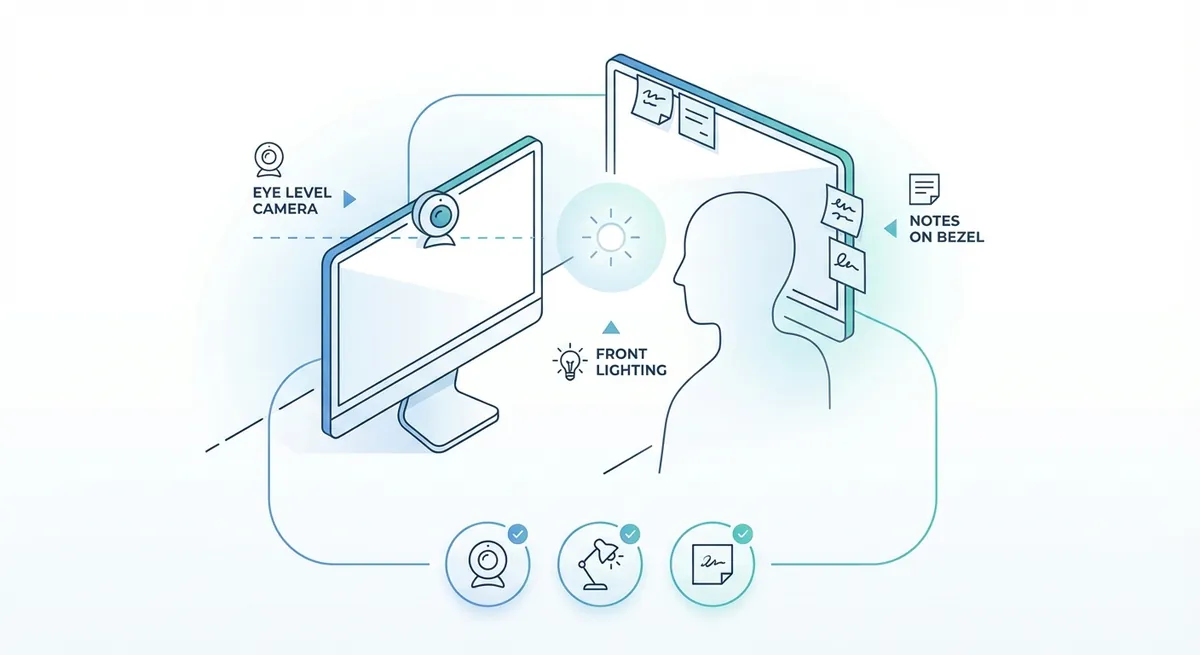
A visual diagram showing the ideal desk setup, including camera placement at eye level, light source positioning in front of the face, and note placement on the monitor bezel
Remote vs. In-Person: What's the Difference?
Here is a quick breakdown of how your approach should shift between the two formats.
| Feature | In-Person Interview | Remote Interview |
|---|---|---|
| Arrival | Arrive 15 mins early to lobby | Log in 3-5 mins early |
| Eye Contact | Look at the interviewer's eyes | Look at the camera lens |
| Small Talk | Happens walking to the room | Happens in the first 2 mins of call |
| Notes | Notebook on table (sparingly) | Post-its on screen (hidden) |
| Closing | Firm handshake | Wave and distinct "Goodbye" |
How do you find these jobs in the first place?
If you are reading this, you might already have an interview lined up. But if you are still looking to find remote jobs, you need to widen your search. Don't just look at the big boards. Look at specific remote-first job sites.
Also, clarify if you are looking for work from home exclusively or if you are open to hybrid work. Many companies are moving to hybrid models. Being open to coming into the office once a week might double your opportunities.
Check the U.S. Department of Labor (CareerOneStop): Virtual Interviews for more resources on the technical side of these meetings.
Once you find a listing, speed matters. Customizing your resume for every single application is tedious but necessary. You can speed this up by running your base resume through our Resume Checker to see how it scores against standard ATS filters.
Key Takeaways
- Test your tech. Do it early. Do it often. Audio quality is priority number one.
- Look at the dot. Eye contact means looking at the camera, not the screen.
- Light your face. Face a window or use a lamp. Don't be a shadow.
- Cheat smart. Use sticky notes on your monitor for quick reminders.
- Dress the part. Wear real pants. It changes your mindset.
These remote work tips aren't just about survive the interview. They are about showing the employer that you are already comfortable in a digital environment. You are showing them you are ready to start on day one. So set up your lights, check your mic, and go get that offer.